
Why do you need to disable the Edge browser SmartScreen warning?
The built-in SmartScreen feature of Microsoft Edge browser is designed to protect users from malicious websites and phishing attacks, but it sometimes produces false positives for third-party hosted URLs, displaying a red warning page. Such false positives can cause psychological panic among users and affect normal work and procurement processes. In fact, disabling this feature does not significantly impact daily online security, especially for engineering and procurement personnel accessing trusted industry websites.
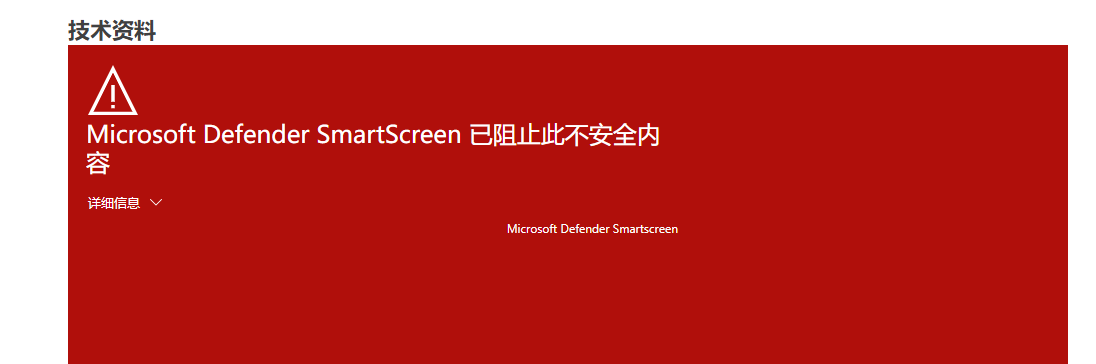
How to disable the SmartScreen red warning?
Disabling the SmartScreen feature is very simple; just follow the steps below. Please note that after disabling, the browser will no longer perform real-time security checks on websites, so it is recommended to use it only in trusted network environments.
Detailed steps
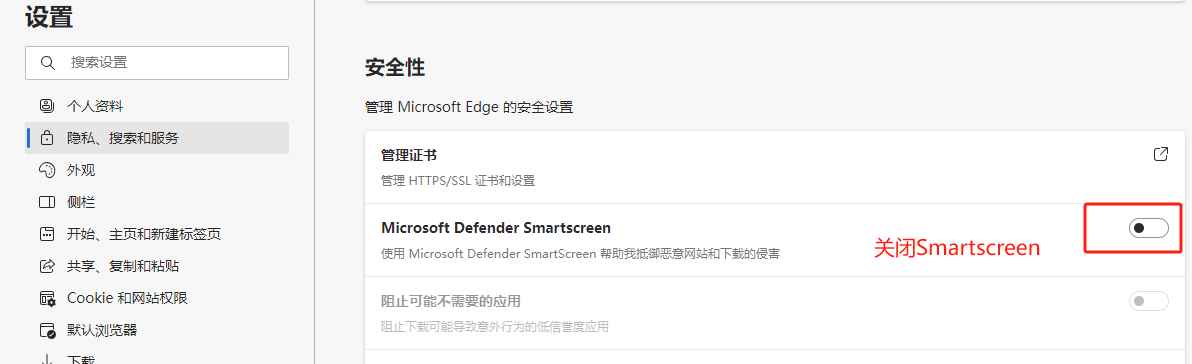
- Open the Edge browser, click the three-dot menu in the upper right corner, and select Settings.
- In the left navigation bar of the settings page, click Privacy, search, and services.
- Scroll down to the Security section.
- Find the Microsoft Defender SmartScreen option and toggle its switch to the off state.
Precautions
- After disabling SmartScreen, the browser will no longer block known malicious websites, so please ensure that the URLs you visit come from reliable sources.
- If you only need to temporarily access a falsely flagged website, you can click "More information" on the warning page and select "Continue to visit" without globally disabling it.
- For enterprise environments, it is recommended to manage SmartScreen settings uniformly through Group Policy to balance security and convenience.
Frequently Asked Questions
| Question | Answer |
|---|---|
| Will disabling SmartScreen affect browser updates? | No, browser updates are independent of the SmartScreen feature. |
| How to re-enable it after disabling? | Follow the same steps and toggle the switch to the on state. |
| Are there other alternative security measures? | You can install reliable third-party security extensions, such as ad blockers or security plugins. |