
PMXX5x/FMX5x Language Selection Operation Guide
The PMXX5x and FMX5x series instruments support a multilingual interface, with the default language being English. This guide will help you quickly switch the instrument language to Chinese, improving operational convenience.
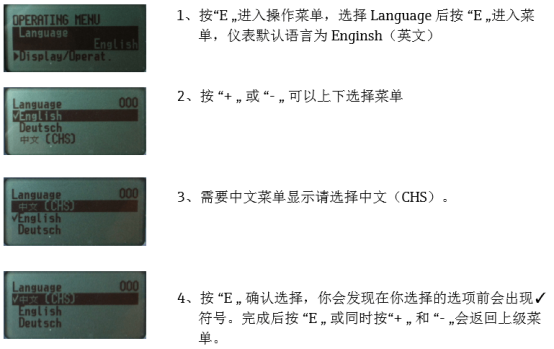
Operation Steps
- Enter the Operation Menu: Press the "E" key on the instrument panel to enter the operation menu. Use the "+" or "-" keys to move the cursor up or down, select the "Language" option, and then press the "E" key again to enter the language settings menu. At this point, the instrument's default language is English.
- Select Language: Use the "+" or "-" keys to browse the list of available languages and find the Chinese (CHS) option.
- Confirm Selection: Press the "E" key to confirm the selection. After successful selection, a √ symbol will appear before the selected option.
- Return to Upper Menu: After completing the settings, press the "E" key, or press the "+" and "-" keys simultaneously, to return to the upper menu.
Notes
- Ensure the instrument is powered on during operation.
- If the Chinese option is not found, check whether the instrument firmware version supports Chinese.
- After the settings are completed, the interface will immediately switch to the selected language.
Language Option Comparison
| Language | Code | Description |
|---|---|---|
| English | EN | Default language |
| Chinese | CHS | Simplified Chinese |
Through the above simple steps, you can easily set the PMXX5x/FMX5x instrument language to Chinese, thereby more efficiently viewing parameters and operating the device.