
E+H PROMAG 50 Quick Setup Menu Overview
E+H PROMAG 50 is a high-performance electromagnetic flowmeter introduced by Endress+Hauser, widely used in industrial process measurement. Its Quick Setup menu provides an efficient and intuitive configuration method, allowing users to quickly complete key parameter settings on site. Through this menu, engineers can complete most commissioning tasks without delving into complex menu trees.
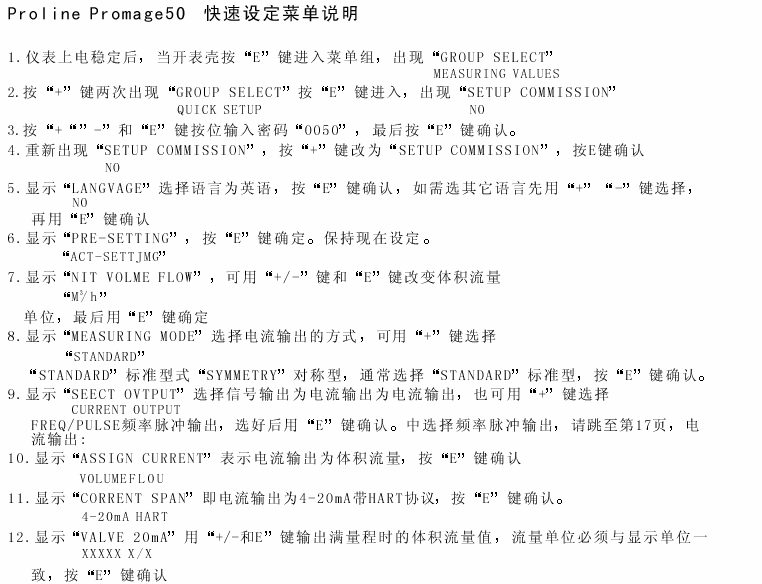
Access and Navigation of the Quick Setup Menu
How to Enter the Quick Setup Menu
- Ensure the instrument is powered on and in measurement mode.
- Press the E key to enter the main menu.
- Use the + or - keys to select the "Quick Setup" option.
- Press the E key to confirm and enter the Quick Setup menu.
Menu Navigation Key Functions
- + / -: Scroll through menu items or modify parameter values.
- E: Confirm selection or enter the next menu level.
- ESC: Return to the previous menu or cancel the current operation.
Core Parameter Configuration in the Quick Setup Menu
The Quick Setup menu typically includes the following key parameters, which users can set according to actual working conditions.
| Parameter | Description | Typical Setting |
|---|---|---|
| Language | Interface display language | Chinese/English |
| Engineering Units | Units for flow, volume, etc. | m³/h, L/min |
| Full Scale | Full scale flow value | Determined by sensor |
| Damping | Output response time | 1~10 seconds |
| Empty Pipe Detection | Empty pipe alarm function | On/Off |
| Low Flow Cutoff | Low flow ignore threshold | 0.5% of full scale |
Detailed Parameter Setting Steps
Step 1: Select Language and Units
- In the Quick Setup menu, select "Language" and set it to "Chinese".
- Select "Engineering Units" and set the flow unit (e.g., m³/h) according to process requirements.
Step 2: Set Full Scale and Damping
- Enter the "Full Scale" setting and input the sensor's full scale value.
- Enter the "Damping" setting; it is usually recommended to set it to 1~5 seconds to balance response speed and stability.
Step 3: Configure Empty Pipe Detection and Low Flow Cutoff
- Turn "Empty Pipe Detection" on or off according to the pipeline medium conditions.
- Set the "Low Flow Cutoff" value, typically 0.5%~2% of full scale.
Step 4: Save and Exit
- Press the E key to save all settings.
- Press the ESC key to return to measurement mode; the instrument will start operating with the new parameters.
Common Application Scenarios of the Quick Setup Menu
- New Instrument Commissioning: Quickly complete basic parameter configuration and put into operation.
- Process Changes: Adjust full scale or units to adapt to new production requirements.
- Troubleshooting: Check or modify parameters such as empty pipe detection and low flow cutoff.
Precautions and Best Practices
- Before modifying parameters, it is recommended to record the original values for restoration.
- Ensure the full scale setting matches the sensor nameplate to avoid measurement errors.
- Too long damping time may cause slow response, while too short may result in large output fluctuations.
- Empty pipe detection should be used with caution in non-full pipe conditions to avoid false alarms.
- After completing the settings, it is recommended to perform a zero calibration to ensure accuracy.
Summary
The E+H PROMAG 50 Quick Setup menu provides engineers with an efficient and standardized commissioning approach. By properly configuring parameters such as language, units, full scale, and damping, it can significantly improve instrument commissioning efficiency and measurement reliability. Following the steps and best practices described in this article can help you quickly complete on-site commissioning and ensure long-term stable operation of the flowmeter.