
Overview of the Current Simulation Function of the 83 Series Mass Flowmeter
The 83 series mass flowmeter has a current simulation function, which can be used to calibrate and test the current output loop. This function is controlled through photosensitive touch keys and is easy to operate. This article will introduce its operation steps and precautions in detail.
Basic Operation of Photosensitive Touch Keys
The 83 series mass flowmeter uses photosensitive touch keys, including the "+", "-", and "E" keys. These keys are used for menu navigation and parameter setting.
Key Function Description
- "+" and "-" keys: Used to adjust values or scroll through menu options.
- "E" key: Used to enter menus, confirm input, or execute operations.
Exit and Cancel Operations
- Press the "+" and "-" keys simultaneously to exit the function matrix step by step and return to the main display page.
- Press and hold the "+" and "-" keys simultaneously for more than 3 seconds to return directly to the main display page.
- Press the "+" and "-" keys simultaneously to cancel the current data input.
Entering the Output Menu and Settings
To set the current simulation function, you need to enter the output menu. Press the "E" key to enter the menu, then use the "+" or "-" keys to find the OUTPUTS option.
Modifying the Password
Entering the output menu may require a password. The default password is 0083, or you can directly enter 83. When entering, after the third "*" from left to right turns into an enter key, press the "E" key to confirm.
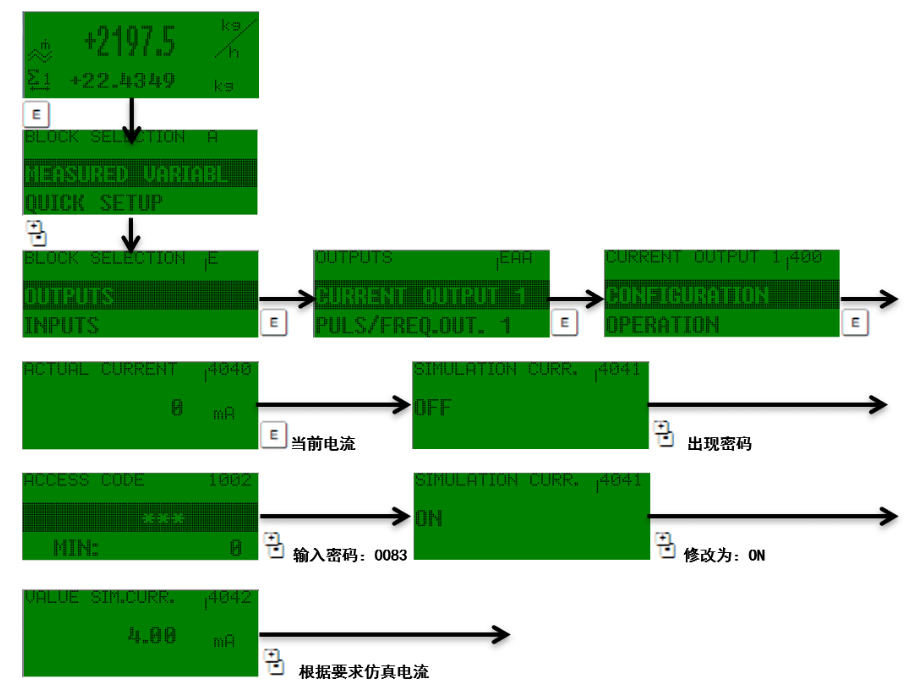
Operation Steps for the Current Simulation Function
The following are the detailed steps for setting the current simulation function:
- Press the "E" key to enter the menu.
- Use the "+" or "-" keys to find the OUTPUTS option.
- Press the "E" key to enter output settings.
- Select the current simulation option as needed.
- Use the "+" or "-" keys to adjust the simulated current value.
- Press the "E" key to confirm the setting.
Precautions
- During operation, if you need to exit, you can press the "+" and "-" keys simultaneously to return step by step, or long-press for 3 seconds to return directly to the main display page.
- When inputting data, pressing the "+" and "-" keys simultaneously can cancel the input.
- Ensure the password is entered correctly to avoid being unable to enter the output menu.