
Overview of the Low Flow Cutoff Function on the 83 Series Mass Flowmeter
The 83 series mass flowmeter is widely used in industrial process measurement, and its low flow cutoff function can effectively suppress false signals caused by small pipeline flow or vibration. Properly setting this function improves measurement stability and output reliability.
This article explains the setup process related to low flow cutoff step by step, focusing on photosensitive touch key operation, menu access methods, password modification, and basic function configuration.
Basic Operation of the Photosensitive Touch Keys
The 83 series uses photosensitive touch keys for human-machine interaction. The main keys include the "+", "-", and "E" keys. Familiarity with the combined operation of these keys is a prerequisite for completing the low flow cutoff setup.
Common Key Functions
- "+" key: increase the value or scroll up
- "-" key: decrease the value or scroll down
- "E" key: enter the menu or confirm input
Combined Key Operation Instructions
- Press the "+" and "-" keys simultaneously: step back through the function matrix and return to the main display page
- Press and hold the "+" and "-" keys simultaneously for more than 3 seconds: return directly to the main display page
- Press the "+" and "-" keys simultaneously: cancel the current data input
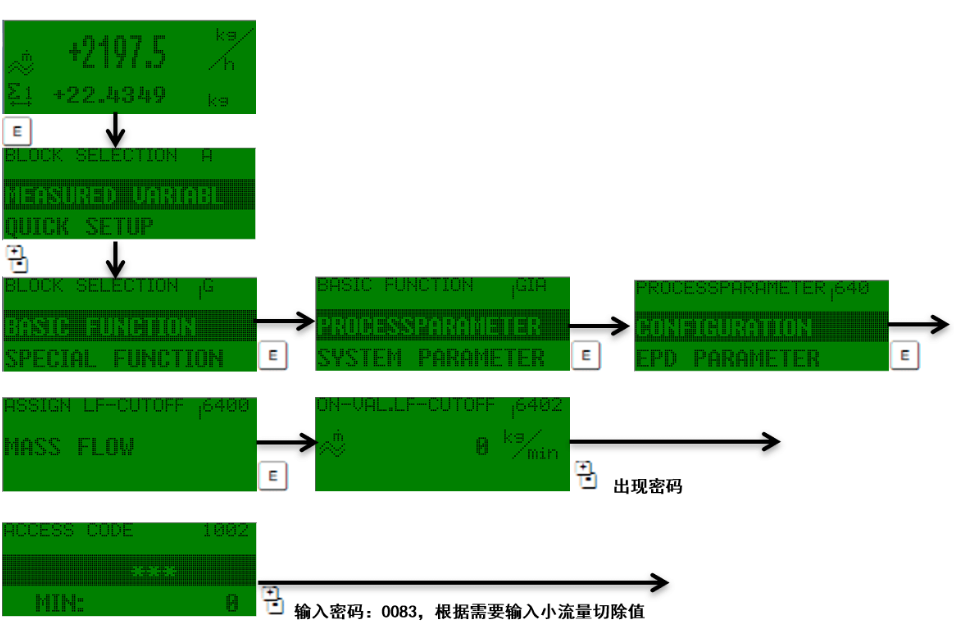
Entering the Basic Function Menu
The low flow cutoff parameter is located in the BASIC FUNCTION menu. Follow the steps below to enter this menu.
Operation Steps
- Press the "E" key to enter the main menu.
- Use the "+" or "-" key to scroll and find the BASIC FUNCTION option.
- Press the "E" key to confirm and enter.
Password Modification and Confirmation
Before entering the basic function menu, a password may be required. The default password for the 83 series is 0083, or you can directly enter "83".
During input, when the third "*" from left to right turns into a carriage return key, press the "E" key to confirm and pass.
Password Input Key Points
- Default password: 0083 or 83
- Observe the third "*" changing into a carriage return key
- Press the "E" key to complete confirmation
Recommendations for Setting the Low Flow Cutoff Parameter
After entering BASIC FUNCTION, the low flow cutoff value can be set according to process requirements. It is recommended to adjust gradually and observe output stability based on the actual minimum pipeline flow and vibration conditions.
| Parameter Item | Description | Recommendation |
|---|---|---|
| Low flow cutoff value | Output is zeroed when below this value | Set to 5%~10% of the normal minimum flow |
| Cutoff enable | Turns the cutoff function on or off | Recommended to enable when vibration is high |
| Response time | Delay of the cutoff action | Adjust according to process fluctuations |
After setting is complete, press the "E" key to save, and use the combined keys to return to the main display page. Verify whether the low flow cutoff takes effect by observing the current output or pulse output.