
Operation Guide for Totalizer Setting and Reset of 83 Series Mass Flow Meters
The 83 series mass flow meters use photoelectric touch keys for control and support totalizer setting and reset. Correct operation ensures accurate accumulation and display of flow data. This article is intended for engineering and technical personnel and procurement personnel, providing detailed operating steps and precautions.
I. Basic Operation of Photoelectric Touch Keys
The photoelectric touch keys include the "+", "-", and "E" keys, used for menu navigation and data input. Mastering the basic operations is a prerequisite for totalizer setting.
- Exit function matrix: Press the "+" and "-" keys simultaneously to exit the function matrix step by step and return to the main display page.
- Quickly return to main display page: Press and hold the "+" and "-" keys simultaneously for more than 3 seconds to return directly to the main display page.
- Cancel data input: Press the "+" and "-" keys simultaneously to cancel the current data input operation.
- Enter menu: Press the "E" key to enter the menu and find the TOTALIZERS option.
II. Totalizer Mode Selection
The TOTALIZERS menu contains three totalizer modes, corresponding to different measurement directions. Users can choose according to actual needs.
| Totalizer Mode | Measurement Mode | Description |
|---|---|---|
| TOTALIZER1 | BANLANCE (bidirectional) | Factory default setting, suitable for bidirectional flow measurement |
| TOTALIZER2 | FORWARD (forward) | Accumulates forward flow only |
| TOTALIZER3 | RESERVE (reverse) | Accumulates reverse flow only |
Generally, TOTALIZER1 is selected at the factory. If modification is needed, enter the corresponding mode for setting.
III. Password Modification and Confirmation Operation
Modifying totalizer-related parameters may require entering a password. The default password is 0083, or you can directly enter "83".
- On the password input screen, at the third "*" from left to right, when the "*" changes to a carriage return symbol, it indicates that input is complete.
- Press the "E" key to confirm and enter subsequent settings.
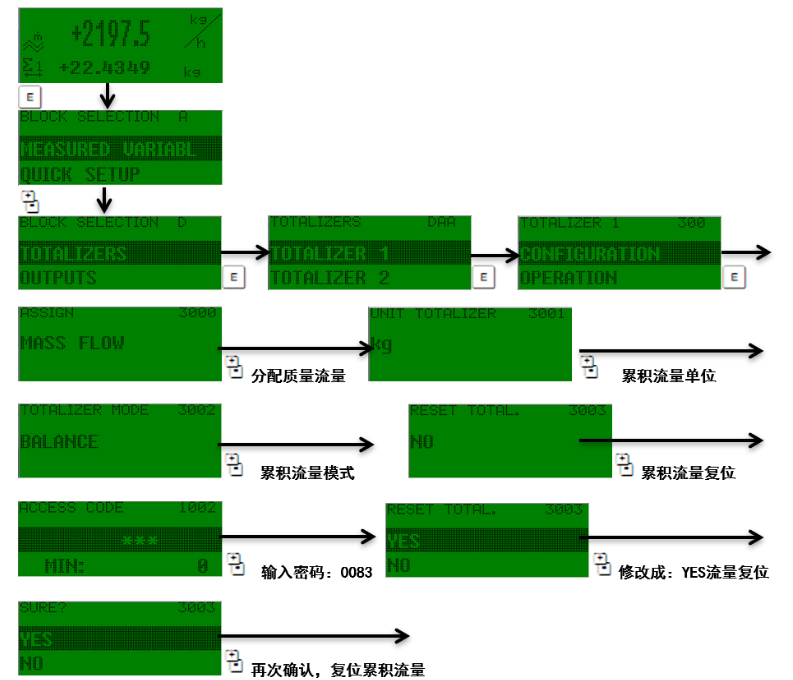
IV. Totalizer Reset Method
Resetting the totalizer value clears the current accumulated data and restarts measurement. The reset operation is usually completed in the TOTALIZERS menu. Specific steps may vary by model; please refer to the device manual. Generally, it can be achieved by selecting the corresponding totalizer mode and executing the reset command.
During operation, please ensure that you have exited the setting menu to avoid misoperation affecting measurement accuracy.