
Prosonic 91 Pulse Output Setup Overview
Prosonic 91 is an ultrasonic transmitter used for continuous level measurement. Its pulse output function can convert the level signal into a frequency signal, making it easy to integrate with devices such as PLCs or counters. Correctly setting the pulse output is crucial for system accuracy and stability. Based on the official documentation, this article introduces the setup process step by step.
Preparation Before Setup
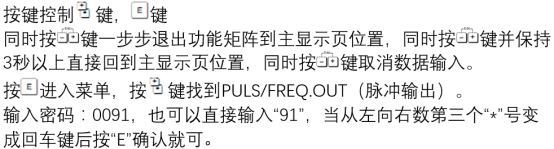
Before starting configuration, please ensure that the device is correctly installed and powered on, and that it is in a safe operating environment. It is recommended to record the original parameters for restoration.
- Tool preparation: screwdriver, HART communicator, or configuration software.
- Safety confirmation: comply with on-site safety regulations to prevent incorrect operations from affecting production.
- Parameter backup: record the current output configuration to avoid setting conflicts.
Pulse Output Parameter Configuration Steps
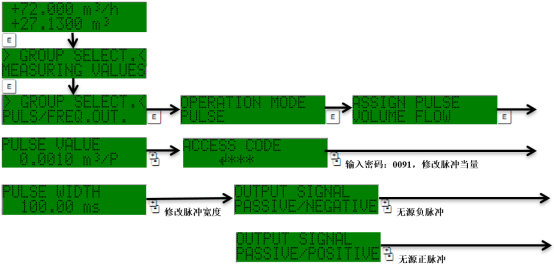
Enter the menu through the local display or a remote tool, and operate according to the following steps:
- Enter the output setup menu: in the main menu, select "Output" -> "Pulse Output".
- Select the pulse output mode: according to requirements, select "Frequency Output" or "Pulse Output".
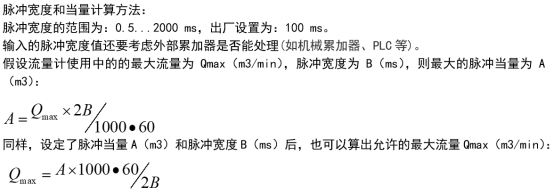
- Set the pulse equivalent: define the level change represented by each pulse (for example, 1 pulse = 1 mm).
- Configure the pulse width: adjust the pulse duration to ensure that the receiving device can correctly identify it.
- Set the upper limit frequency: prevent signal loss caused by excessively high frequency.
- Save and exit: after confirming the parameters, save them, and the system will automatically restart the output function.
Description of Key Parameters and Recommended Values
The following table lists the main parameters of the pulse output and their typical settings for commissioning reference.
| Parameter | Description | Recommended Value |
|---|---|---|
| Pulse equivalent | The level change corresponding to each pulse | 1 mm/pulse |
| Pulse width | Duration of the pulse high level | 50 ms |
| Upper limit frequency | Maximum output frequency | 10 kHz |
| Output mode | Frequency or pulse sequence | Pulse sequence |
Common Issues and Precautions
During setup, unstable signals or counting errors may occur, usually related to parameter mismatch or wiring interference.
- No output: check the power supply and wiring, and confirm that the output mode has been enabled.
- Counting deviation: adjust the pulse equivalent or check the threshold of the receiving device.
- Signal interference: use shielded cables and keep them away from power lines.
After completing the setup, it is recommended to perform an actual level change test to verify output accuracy. If further assistance is needed, please refer to the complete Prosonic 91 manual or contact technical support.