
Prosonic 91 System Unit Modification Operation Guide
The Prosonic 91 is an ultrasonic flowmeter commonly used in industrial sites, and its system unit settings directly affect the reading and recording of measurement data. Correctly changing the system units is a basic operation to ensure data consistency.
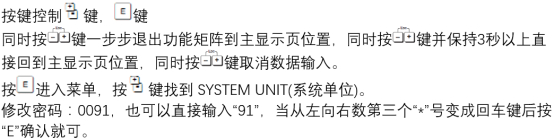
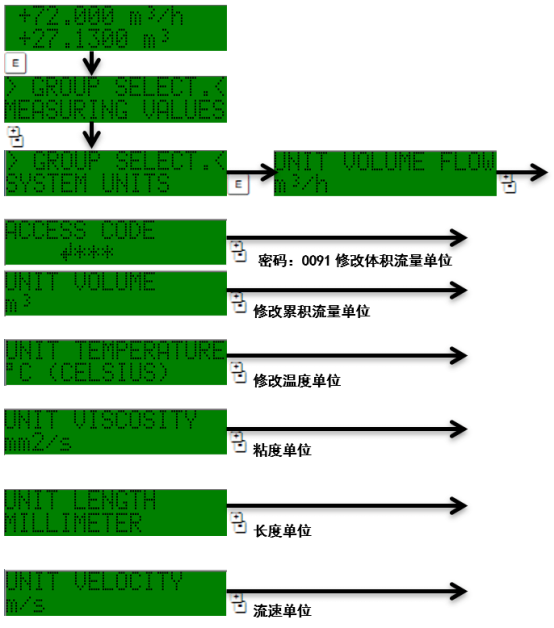
Operating Steps
Please follow the steps below to change the system units of the Prosonic 91:
- Enter the main menu and select the "System Settings" option.
- Find the "Units" entry in the submenu.
- Press the "Confirm" key to enter the unit selection interface.
- Use the arrow keys to select the desired unit (such as m³/h, L/min, etc.).
- Press the "Confirm" key to save the settings, and the screen will return to the measurement interface.
Precautions
- After changing the units, please check whether all related parameters (such as range and alarm values) need to be adjusted accordingly.
- Ensure that the units are consistent with the settings of the host computer or recorder to avoid misunderstanding of data.
- If the display is abnormal after modification, you can restore the factory settings or recalibrate.
Common Unit Options
| Unit Type | Available Values |
|---|---|
| Volume Flow | m³/h, L/min, gal/min |
| Totalized Flow | m³, L, gal |
| Temperature | °C, °F |
Correctly setting the units can improve measurement efficiency, and it is recommended that this be performed by professional personnel.