
Prosonic 92F Cumulative Flow Reset to Zero Overview
Prosonic 92F is an ultrasonic flowmeter commonly used in industrial sites, and its cumulative flow function is used to measure the total flow of fluid in the pipeline. When it is necessary to restart measurement or perform maintenance, resetting the cumulative flow to zero is a necessary operation. Based on the official operation interface, this article provides clear reset steps and precautions.
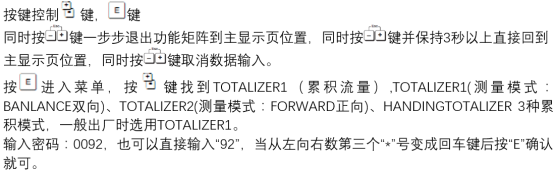
Reset to Zero Operation Steps
Step 1: Enter the Totalizer Menu
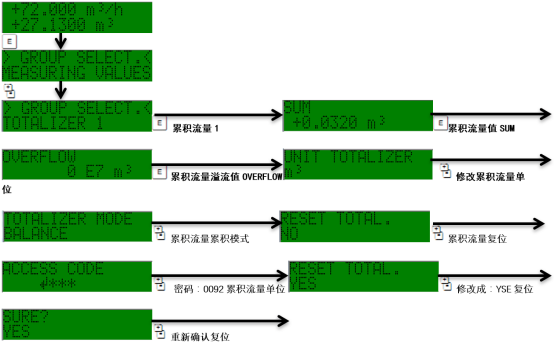
Enter the Totalizer menu through the device panel or debugging software. Usually, on the main measurement interface, press the "E" key or use the navigation keys to find the "Totalizer" option.
Step 2: Select the Reset Function
In the totalizer menu, select the Reset or Clear function. Some versions may display it as "Reset Totalizer".
Step 3: Confirm the Reset Operation
The system will prompt for confirmation. After selecting "Yes" or "Confirm", the cumulative flow value will be reset to zero. After reset, the flowmeter will start accumulating again.
Precautions for Reset Operation
- Permission requirements: The reset operation usually requires entering a password or having the corresponding permissions. For the default password, please refer to the manual.
- Data loss: After reset, the cumulative flow value cannot be recovered. It is recommended to record or back it up in advance.
- Process impact: Reset does not affect instantaneous flow measurement; it only clears the cumulative value.
- Version differences: The menu path may vary slightly among different firmware versions. Please refer to the actual interface.
Common Problems and Solutions
| Problem | Possible Cause | Solution |
|---|---|---|
| Cannot enter the reset menu | Insufficient permissions or incorrect password | Enter the correct password or contact the administrator |
| Value does not return to zero after reset | Operation not confirmed or system failure | Repeat the operation and confirm, or restart the device |
| Reset option is grayed out and unavailable | The device is in a locked state | Unlock it or switch to edit mode |
Summary
Mastering the Prosonic 92F cumulative flow reset to zero method can ensure the accuracy and traceability of flow measurement data. During operation, be sure to pay attention to permissions and data backup to avoid misoperation. For more detailed parameter settings, please refer to the official technical manual.