
Prosonic 92F Ultrasonic Flowmeter Quick Setup Guide
Prosonic 92F is a high-performance ultrasonic flowmeter widely used in industrial flow measurement. Correct quick setup ensures fast instrument commissioning and maintains high accuracy. This article is intended for engineering technicians and procurement personnel, providing a clear setup process.
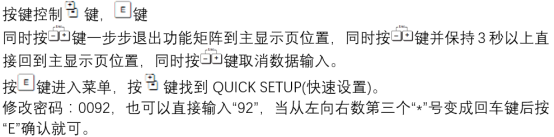
1. Pre-installation Preparation
1.1 Inspection and Confirmation
- Confirm pipe material, diameter, wall thickness, and liner type.
- Check whether the sensor model matches the pipe size.
- Prepare necessary installation tools and couplant.
1.2 Environmental Requirements
- Avoid strong electromagnetic interference sources, such as frequency converters and high-power motors.
- Ensure the pipe is full of fluid, with no bubbles or deposits.
- Ambient temperature should be within the instrument's specified range.
2. Sensor Installation
2.1 Installation Location Selection
Select a location with an upstream straight pipe length ≥10D and downstream ≥5D (D is the pipe diameter). Avoid installation near disturbance sources such as valves, elbows, and pump outlets.
2.2 Installation Steps
- Clean the pipe surface, removing rust and paint.
- Apply couplant and press the sensor tightly against the pipe wall.
- Secure the sensor with clamps to ensure no looseness.
- Adjust the sensor spacing according to the instrument prompts or calculated values.
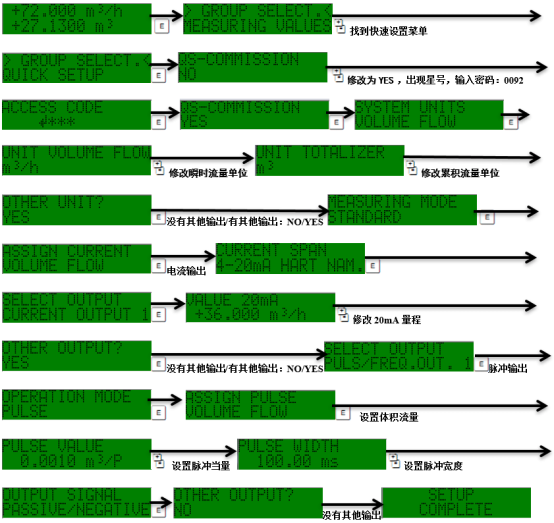
3. Parameter Configuration
3.1 Basic Parameters
- Pipe parameters: outer diameter, wall thickness, material, liner.
- Fluid parameters: type, temperature, sound velocity.
- Sensor parameters: installation method, spacing.
3.2 Output Settings
- Select output signal: 4-20mA, pulse, or digital communication.
- Set the upper and lower range limits to ensure compatibility with the system.
- Configure alarm outputs (e.g., empty pipe, fault).
4. Commissioning and Verification
4.1 Zero Calibration
When the pipe is full of static fluid, perform zero calibration to eliminate installation errors.
4.2 Measurement Verification
- Compare the instrument display value with the actual flow rate (e.g., portable ultrasonic flowmeter).
- Check signal strength and signal-to-noise ratio to ensure stability.
- If the error is large, recheck installation and parameters.
5. Common Problems and Solutions
| Problem | Possible Cause | Solution |
|---|---|---|
| No signal | Sensor not well coupled | Reapply couplant and tighten |
| Fluctuating readings | Fluid contains bubbles or disturbances | Vent air or adjust installation position |
| Reduced accuracy | Incorrect parameter settings | Verify pipe and fluid parameters |
6. Summary
Following the above steps allows quick completion of Prosonic 92F setup. Correct installation and parameter configuration are key to ensuring long-term stable operation. Regular maintenance and recording of operating data are recommended.