
Prosonic 92F System Unit Modification: Operation Steps and Precautions
Prosonic 92F is a commonly used ultrasonic flowmeter in industrial sites. Its system units (such as volume flow, mass flow, temperature, etc.) can be flexibly modified according to process requirements. Correctly adjusting system units ensures that measurement data is consistent with the host system and avoids reading errors caused by unit mismatch.
1. Preparation Before Modification
Before modifying system units, please confirm the following conditions to ensure operation safety and parameter validity.
- The instrument is in normal power-on state with no alarms displayed.
- The current user access password has been obtained (usually default or engineer level).
- Record the original unit settings for later verification or restoration.
2. Specific Steps to Modify System Units
The following steps apply to the standard operating procedure of Prosonic 92F. Menu names may vary slightly between firmware versions.
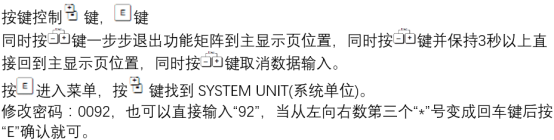
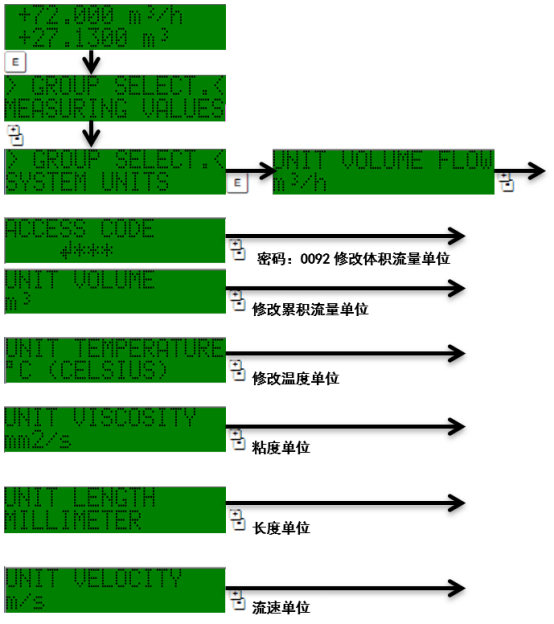
- Press the E key to enter the main menu, use the +/- keys to select "Setup".
- Press the E key to confirm, entering the "System Units" submenu.
- Select the unit type to modify, such as Volume Flow, Mass Flow, or Temperature.
- Press the E key to enter, use the +/- keys to switch to the target unit (e.g., m³/h, L/min, kg/h, °C).
- Press the E key to confirm, the screen prompts "Save Changes?", select "Yes" to save.
- Press the E key to return to the main interface, check whether the measurement value unit has been updated.
3. Common Unit Options and Applicable Scenarios
Prosonic 92F supports multiple unit combinations. Users can choose according to process media and industry habits. The following table lists common units and their typical applications.
| Unit Type | Selectable Units | Typical Application |
|---|---|---|
| Volume Flow | m³/h, L/min, US gal/min | Water treatment, chemical liquids |
| Mass Flow | kg/h, t/h, lb/min | Steam, gas metering |
| Temperature | °C, °F, K | Process temperature compensation |
4. Verification and Precautions After Modification
After completing unit modification, verification must be performed to ensure measurement and display consistency.
- Compare whether the units of instantaneous flow and totalized flow are updated synchronously.
- Check whether the scale of 4-20mA output or pulse output needs recalibration.
- If unit modification affects alarm thresholds or batch control, related parameters need to be adjusted synchronously.
- It is recommended to verify under empty pipe or stable flow field to avoid misjudgment.
If the menu cannot be saved or the unit is grayed out and unselectable, it is usually related to user permissions or measurement mode. You can switch to engineer permissions or check the sensor configuration.