
Promag 10 5XBB Quick Access Overview
Promag 10 5XBB is an electromagnetic flowmeter launched by Endress+Hauser, widely used in industrial process measurement. The quick access function allows users to directly enter key parameter menus, improving commissioning and maintenance efficiency.
This article is aimed at engineering technicians and procurement personnel, introducing the operation method, parameter structure, and precautions of quick access.
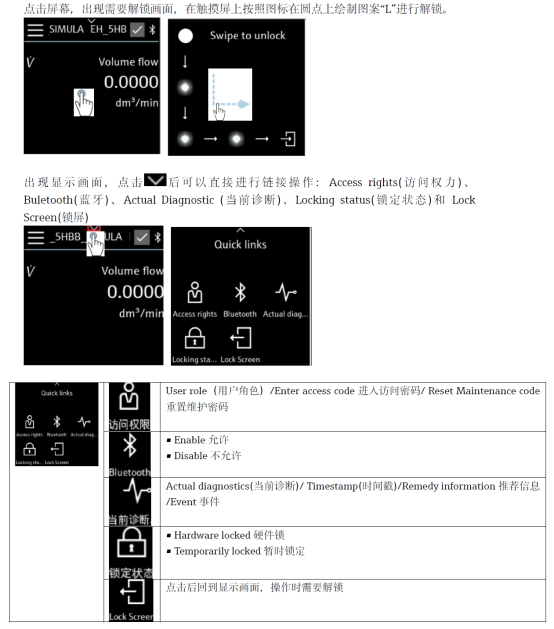
Quick Access Operation Steps
Entering Quick Access Mode
- Ensure the instrument is powered on and in the measurement interface.
- Press the E key to enter the main menu.
- Use the + or - keys to select the "Quick Access" option.
- Press the E key to confirm and enter the quick access menu.
Common Quick Access Parameters
- Measured values: real-time flow rate, total volume.
- Unit settings: volumetric flow unit, mass flow unit.
- Range adjustment: full scale value, low flow cutoff.
- Output configuration: current output, pulse output, frequency output.
- Diagnostic information: alarm records, self-check status.
Parameter Comparison and Setting Recommendations
In different application scenarios, the parameter settings in quick access may vary. The following table lists common configuration comparisons.
| Parameter | Typical Setting | Applicable Scenario |
|---|---|---|
| Range | 0~10 m/s | Water treatment, general liquids |
| Low flow cutoff | 0.5% FS | Prevent empty pipe false alarms |
| Damping time | 1~5 s | Stable display for pulsating flow |
| Current output | 4~20 mA | Remote transmission to PLC/DCS |
Precautions for Quick Access
- Before modifying parameters, it is recommended to record the original values for easy restoration.
- Some parameters can only be accessed in Expert Mode; quick access only provides common items.
- If the instrument is in write protection status, the lock must be released first.
- The quick access menu may vary slightly depending on the firmware version; please refer to the corresponding manual.
Common Problems and Solutions
Unable to enter quick access
- Check whether the keys are locked; try long-pressing the E key to unlock.
- Confirm that the instrument is not in an alarm or fault state.
Parameters do not take effect after modification
- Confirm that the settings have been saved; some parameters require restarting the instrument.
- Check whether they are overwritten by the host computer or control system.
Mastering the quick access method of the Promag 10 5XBB can significantly improve on-site commissioning and maintenance efficiency. For more in-depth configuration, it is recommended to refer to the complete operation manual or contact the manufacturer's technical support.