
Promag 10 5XBB Changing the Display Mode to Show Multiple Variables
The Promag 10 5XBB is an electromagnetic flowmeter in Endress+Hauser's Promag 10 series, supporting multi-variable display of flow, totalizer, and other values. By changing the display mode, multiple process variables can be viewed on the same screen, facilitating on-site commissioning and operation monitoring.
Preparation Before Operation
Before changing the display mode, confirm that the instrument is powered on and in normal measurement status, and prepare the operating permissions.
- Confirm that the instrument is in measurement mode and displays normally.
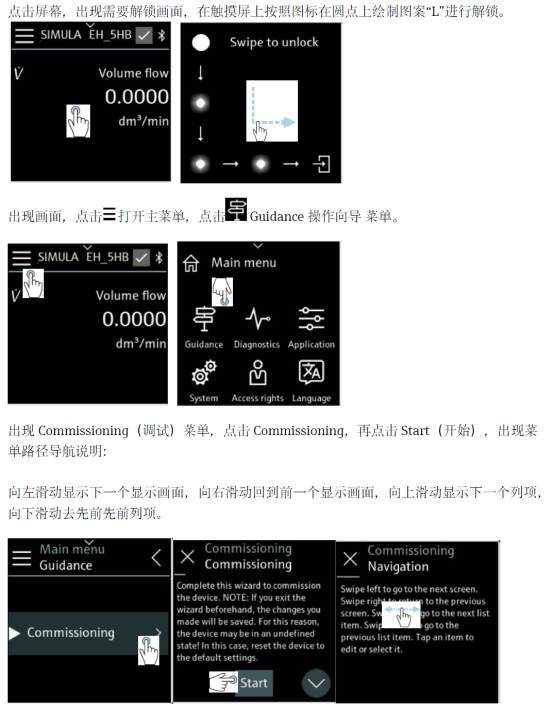
- Confirm that on-site operating permission has been obtained; some parameters can only be modified after unlocking.
- Record the current display configuration so it can be restored in case of an abnormality.
Steps to Change the Display Mode
Enter the menu using the on-site keys, and switch the display mode to multi-variable display by following the steps below.
- Press the E key to enter the main menu.
- Use the + / - keys to select the Display menu.
- Enter the Display mode option.
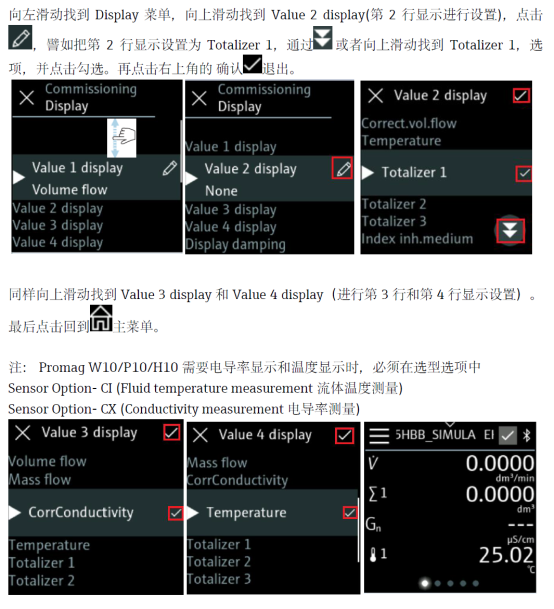
- Select the Multi-variable display mode.
- Press the E key to confirm and save.
- Return to the measurement screen and check whether the multi-variable display is active.
Display Parameter Description
In multi-variable display mode, multiple process variables can be displayed simultaneously. Common display variables are shown in the table below.
| Display variable | Description | Example unit |
|---|---|---|
| Volume flow | Instantaneous volume flow | m³/h |
| Totalizer | Cumulative volume total | m³ |
| Current output | Corresponding output current value | mA |
| Status | Instrument operating status | — |
Precautions
- Menu names may differ slightly between firmware versions; refer to the actual display.
- Changing the display mode does not affect measurement accuracy; it only changes the displayed content.
- If the menu cannot be entered, check whether it has been unlocked or whether the correct password has been entered.
- It is recommended to record the final display configuration after commissioning is complete.
Summary
Through the above steps, the display mode of the Promag 10 5XBB can be quickly changed to multi-variable display, enabling centralized viewing of parameters such as flow and totalizer. Proper configuration of the display mode helps improve the efficiency of on-site inspection and commissioning.