
Promag 10 5XBB Multi-variable Display Modification Overview
Promag 10 5XBB is an electromagnetic flowmeter under Endress+Hauser, supporting measurement and display of multiple process variables. By default, the instrument may only display a single variable, but by modifying the display mode, users can view multiple variables simultaneously on the screen, such as instantaneous flow, cumulative flow, flow velocity, etc.
This article is intended for engineering and technical personnel and procurement personnel, providing clear operating steps to help you quickly complete the multi-variable display setup.
Detailed Operating Steps
Step 1: Enter the Display Settings Menu
- Ensure the instrument is in measurement mode, press the E key to enter the main menu.
- Use the + or - keys to navigate to the "Display" option.
- Press the E key to confirm and enter.
Step 2: Select Multi-variable Display Mode
- In the display menu, find "Display Mode".
- Press the E key to enter, use the + or - keys to select "Multi-variable".
- Press the E key to save the setting.
Step 3: Configure Display Variables
- Return to the display menu, select "Variable Assignment".
- Assign variables to each display line in sequence, for example, select instantaneous flow for the first line and cumulative flow for the second line.
- Press the E key to confirm each selection.
Step 4: Save and Exit
- Press the E key multiple times until returning to measurement mode.
- Check whether the screen displays multiple variables.
Display Effects and Parameter Description
The following are common variable combinations and descriptions in multi-variable display mode:
| Display Line | Variable Name | Description |
|---|---|---|
| First Line | Instantaneous Flow | Current flow value, unit configurable |
| Second Line | Cumulative Flow | Total accumulated amount, resettable |
| Third Line | Flow Velocity | Fluid velocity in the pipe |
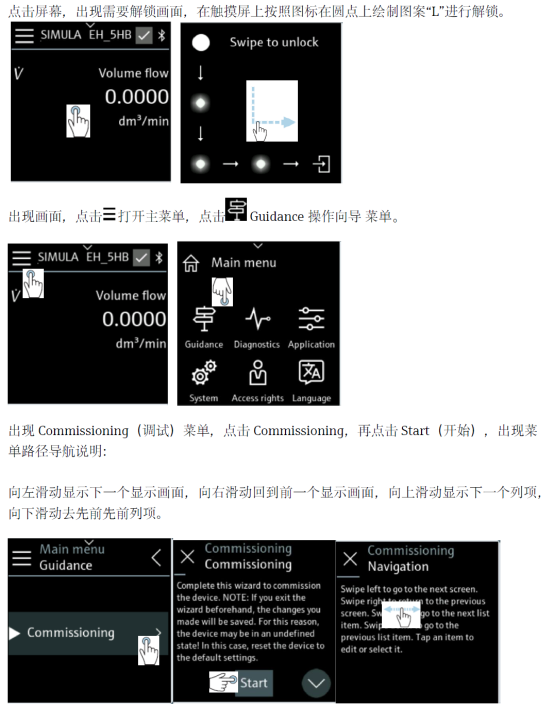
The above figure shows the interface after entering the display menu, where the display mode can be modified using the navigation keys.
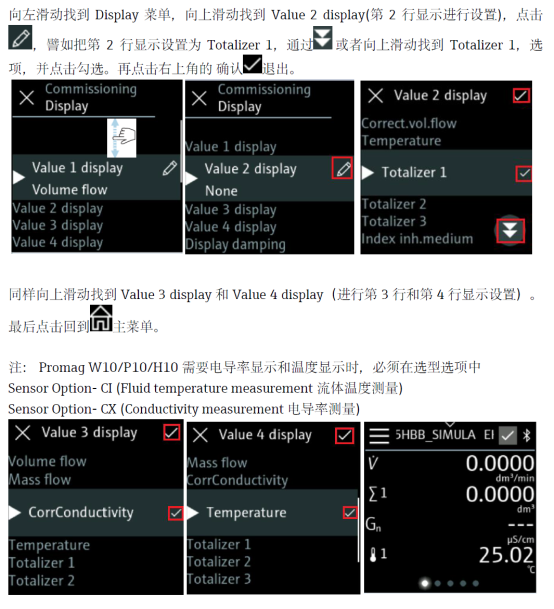
The above figure shows the effect after successful configuration, where the screen simultaneously presents instantaneous flow and cumulative flow.
Precautions
- Modifying the display mode does not affect measurement accuracy, only changes the local display content.
- If remote display is required, ensure the output signal matches the host computer configuration.
- Some firmware versions may have slightly different menu names; please refer to the corresponding manual.
Summary
Through the above steps, you can easily set the Promag 10 5XBB to multi-variable display mode, thereby obtaining more key process information on one screen. This helps improve on-site inspection efficiency and timely grasp of flow status.