
Promag 10 5XBB Hardware Write Protection Switch Overview
Hardware write protection switch is used to prevent configuration parameters of the Promag 10 5XBB electromagnetic flowmeter from being accidentally modified. When the switch is set to the ON position, all write operations via communication or local operation are prohibited. This function is particularly important in industrial applications where instrument parameter safety must be ensured.
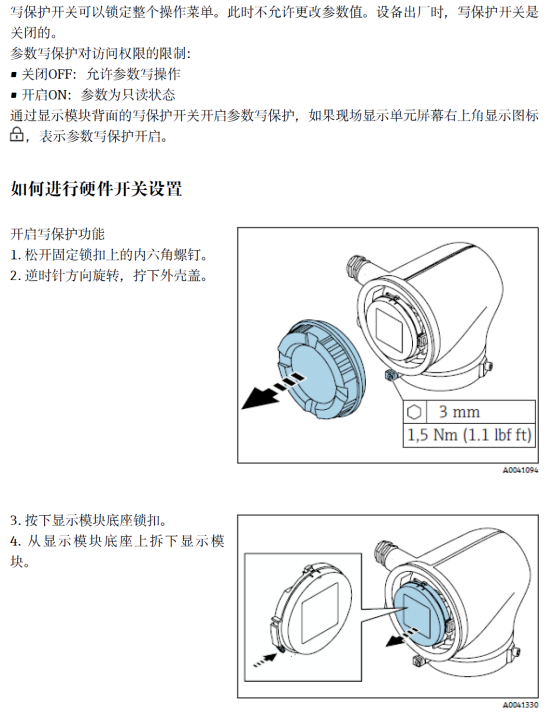
Hardware Write Protection Switch Setting Steps
Please follow the steps below to correctly set the hardware write protection switch and ensure the instrument is in the desired protection state.
- Turn off the instrument power and ensure a safe environment.
- Open the instrument housing and locate the write protection switch (usually located on the electronic module).
- Use a small screwdriver or similar tool to toggle the switch to the desired position: ON (enable write protection) or OFF (disable write protection).
- Reinstall the housing and reconnect power.
- Check the instrument display or confirm via communication that the write protection status is active.
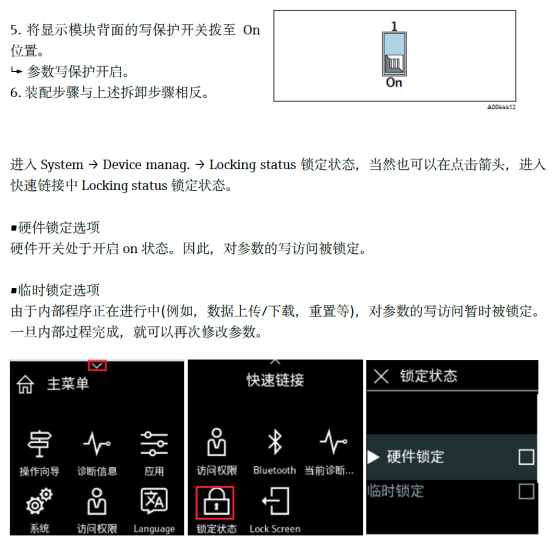
Write Protection Switch Status Description
The table below lists the write protection status and allowed operations corresponding to different switch positions.
| Switch Position | Write Protection Status | Allowed Operations |
|---|---|---|
| ON | Enabled | Parameters can only be read, modification is prohibited |
| OFF | Disabled | Parameters can be read and modified |
Precautions
- Before changing the switch position, be sure to disconnect the instrument power to avoid damaging the device.
- After enabling write protection, all write operations via communication protocols such as HART, PROFIBUS, etc. will be rejected.
- If parameters need to be modified temporarily, the switch can be toggled to OFF, and then restored to ON after completion.
- Please refer to the latest manual for Promag 10 5XBB to obtain specific switch positions and operation details.
Correctly setting the hardware write protection switch can effectively ensure instrument parameter safety and prevent misoperation. If further assistance is needed, please contact technical support.