
Overview of the Promag 10 5XBB Main Menu
Promag 10 5XBB is a commonly used model in the Endress+Hauser Promag 10 series electromagnetic flowmeters. Its main menu is the core entry point for on-site configuration, parameter viewing, and troubleshooting. Understanding the overall structure of the main menu helps engineering technicians quickly locate function items and also helps procurement staff evaluate the operability and maintenance convenience of the instrument.
Below, based on a screenshot of the main menu interface, the menu hierarchy and operation logic are outlined.
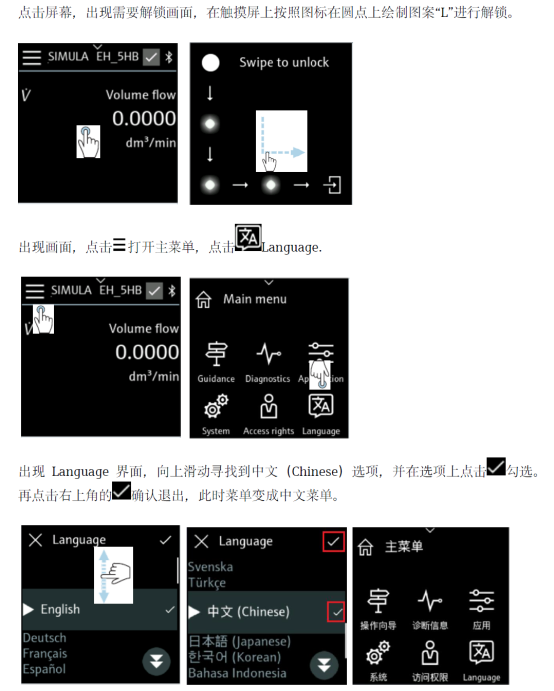
Hierarchical Structure of the Main Menu
The main menu of the Promag 10 5XBB uses a hierarchical menu structure, where users enter submenus level by level via panel keys. Overall, it can be divided into several main areas: measured value display, parameter settings, and diagnostics and maintenance.
- Measured Value Display: The default interface, displaying process variables such as flow rate and totalizer in real time.
- Parameter Settings: Used to configure key parameters such as range, units, and output signals.
- Diagnostics and Maintenance: Used to view alarm information, device status, and simulation test functions.
Switching between these areas is done via the menu key, and the hierarchy is clear, facilitating quick on-site operation.
Description of Main Function Entry Points
After entering the main menu, users can select the corresponding function entry point as needed. Different entry points correspond to different operation permissions and parameter ranges. Some key parameters require entering an access code before they can be modified.
- Press the operation key to enter the main menu home page.
- Use the arrow keys to switch between function groups.
- Press the confirm key to enter the selected submenu.
- After modifying parameters, save and return to the measurement interface.
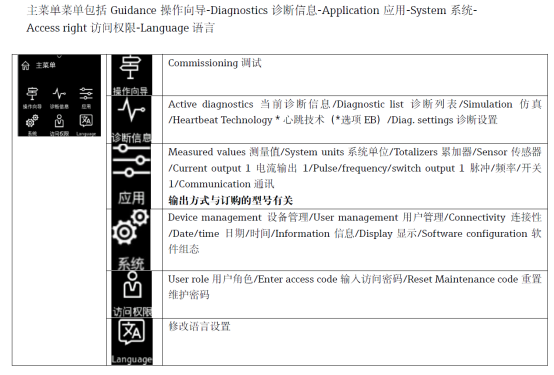
Comparison of Menu Functions and Typical Parameters
For ease of understanding, the following table lists common function groups in the main menu and their typical parameters for reference in model selection and debugging.
| Function Group | Typical Parameters | Description |
|---|---|---|
| Measured Values | Flow rate, totalizer, units | Real-time monitoring of process data |
| Parameter Settings | Range, damping, output | Match process and signal requirements |
| Diagnostics | Alarms, status, simulation | Troubleshoot faults and verify functions |
Operation and Maintenance Recommendations
After becoming familiar with the main menu structure, it is recommended to record commonly used parameters in the device file for quick restoration and comparison in the future. For situations requiring frequent adjustments, access codes can be used to manage permissions and avoid misoperation.
- Confirm that the instrument is in an operable state before debugging.
- After modifying key parameters, save and verify promptly.
- Regularly check the diagnostic menu to detect abnormalities in advance.
Overall, the main menu of the Promag 10 5XBB has a clear structure and well-defined functional partitions, meeting the configuration and maintenance needs of most industrial flow measurement scenarios.