
Promag 10 Volume Flow Simulation Overview
Promag 10 is an electromagnetic flowmeter launched by Endress+Hauser, widely used in industrial process flow measurement. Volume flow simulation is an important means to verify instrument settings and predict measurement results.
Through the simulation function, engineers can check whether the volume flow output is normal without connecting actual media, providing a basis for commissioning and troubleshooting.
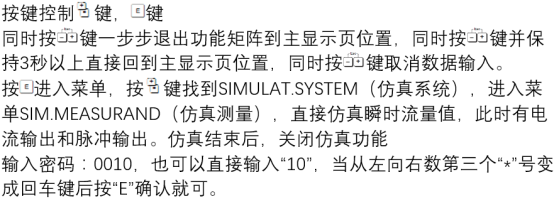
Principles and Applicable Scenarios of Volume Flow Simulation
Simulation Principle
The simulation function of Promag 10 simulates sensor signals through an internal signal generator, causing the transmitter to output the corresponding volume flow according to the set value.
This process does not rely on actual fluid, so verification can be performed under empty pipe or shutdown conditions.
Typical Applicable Scenarios
- Functional testing and acceptance after instrument installation
- Simulating flow signals during control system joint debugging
- Determining transmitter and sensor issues during troubleshooting
- Quick checks before regular calibration
Promag 10 Volume Flow Simulation Operation Steps
Preparation Before Operation
- Confirm that the instrument is powered on and in normal measurement mode
- Record the current volume flow-related parameters for restoration after simulation
- Ensure operation permissions to avoid accidental changes to critical settings
Simulation Setting Steps
- Enter the menu: Setup → Simulation
- Select the Volume Flow simulation type
- Enter the target simulation value, such as 0%, 50%, 100% of range
- Confirm simulation enablement and observe the output current and display value
- After simulation ends, disable the simulation function and restore normal measurement
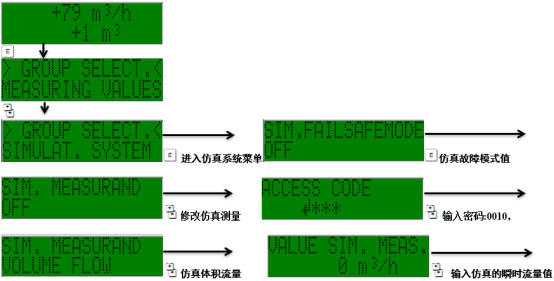
Simulation Parameters and Output Comparison
| Simulation Value | Corresponding Volume Flow | Typical Output Current |
|---|---|---|
| 0% | 0 m³/h | 4 mA |
| 50% | Half range | 12 mA |
| 100% | Full range | 20 mA |
The actual output depends on the range setting and current output configuration. During simulation, it should be checked against process parameters.
Precautions and Common Issues
Precautions
- During simulation, the instrument output does not represent actual flow and must not be used for trade settlement
- After simulation is completed, be sure to disable it to avoid affecting normal production
- Menu paths may vary slightly between different firmware versions
Common Issues
- No output during simulation: Check whether simulation is enabled and output wiring
- Value deviation: Check the range and unit settings
- Unable to enter simulation: Confirm user permissions and instrument status
Summary
Promag 10 volume flow simulation is a practical function in commissioning and maintenance, allowing quick verification of instrument output and system response.
Mastering the correct simulation steps and parameter settings helps improve the measurement reliability and maintenance efficiency of the electromagnetic flowmeter.