
Promag 10 System Unit Modification Operation Guide
Promag 10 is an electromagnetic flowmeter launched by Endress+Hauser and is widely used in industrial flow measurement. In actual use, it may be necessary to modify the system units according to working conditions or customer requirements. This article will introduce the steps for modifying system units in detail.
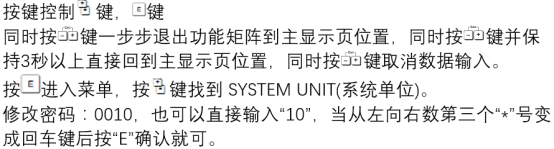
Operation Steps
- Ensure that the flowmeter is in measurement mode, and press the E key to enter the main menu.
- Use the + or - key to select Setup, and press the E key to confirm.
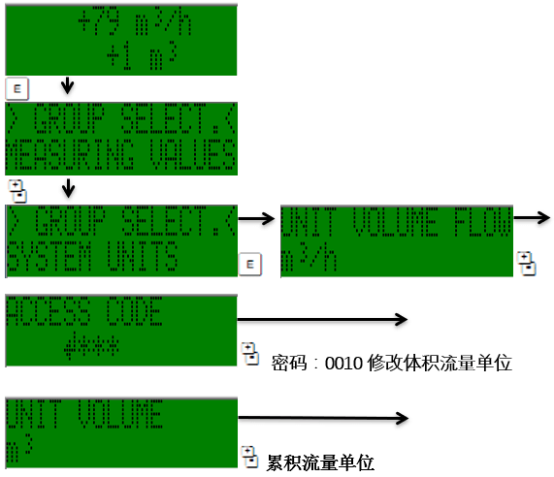
- Select System Units, and press the E key to enter.
- Select the type of unit to be modified, such as Volume Flow, Mass Flow, etc.
- Use the + or - key to select the target unit, and press the E key to confirm.
- Repeat steps 4-5 to modify other units.
- Press the E key to save the settings, or press the ESC key to cancel.
Precautions
- After modifying the units, check whether related parameters (such as range and alarm values) need to be adjusted accordingly.
- Some units may be affected by the country/region setting, and consistency must be ensured.
- During operation, please refer to the accompanying manual, as menus may differ slightly between versions.
Frequently Asked Questions
- Q: The flow display is abnormal after modifying the units?
A: Please check whether the range and units match, and recalibrate if necessary. - Q: Cannot find the System Units menu?
A: Confirm whether you have entered the Setup menu, or contact technical support.
Through the above steps, you can easily complete the system unit modification for the Promag 10. If you have any questions, please consult Endress+Hauser technical support.