
Overview of Promag 53 Current Output Range Setting
The current output range setting of the Promag 53 electromagnetic flowmeter is a key part of on-site commissioning and directly affects the accuracy of signal transmission. Correct range configuration can ensure that the 4-20mA output corresponds linearly to the flow value and avoid display deviation on the host computer. This article explains the setting process step by step based on the actual operation interface.
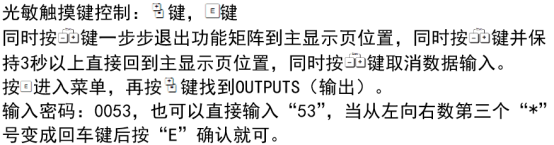
Preparation Before Setting
Before starting the setting, please confirm that the following conditions are met to ensure safe and smooth operation.
- The flowmeter has been correctly installed and powered on, and is in measurement mode.
- The range required by the process has been obtained (for example, 0-100m³/h corresponds to 4-20mA).
- Prepare a HART communicator or operate through the local display module.
- Record the current parameters so they can be restored in case of abnormality.
Current Output Range Setting Steps
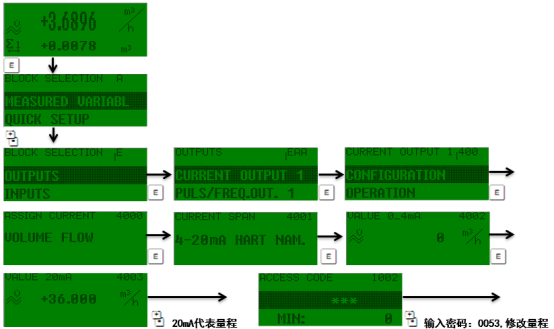
The following steps take operation via the local display module as an example. The operation logic of the HART communicator is similar.
- Enter the main menu and select "Setup" → "Output" → "Current output".
- Select the "Range" option and press the confirm key to enter.
- Enter the flow value corresponding to 4mA (usually 0), and press confirm.
- Enter the flow value corresponding to 20mA (for example, 100), and press confirm.
- Check the set values, save, and exit.
Parameter Description and Precautions
- Value corresponding to 4mA: usually set to 0, but it can also be set to other values to achieve positive and negative flow output.
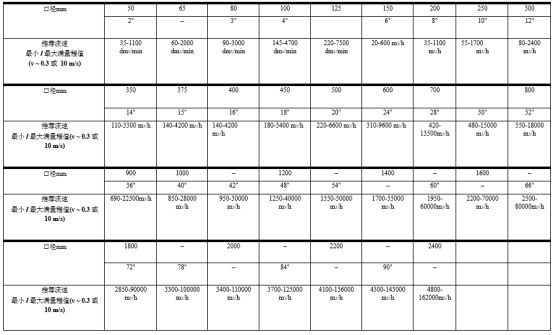
- Value corresponding to 20mA: must be greater than the value corresponding to 4mA and must not exceed the sensor full scale.
- The turndown ratio is recommended to be within 10:1 to ensure accuracy.
- After setting is completed, a multimeter can be used to measure the output current for verification.
Common Problems and Troubleshooting
If the output is abnormal after setting, refer to the following table for quick troubleshooting.
| Symptom | Possible Cause | Solution |
|---|---|---|
| Output is always 4mA | Incorrect range setting or zero flow | Check the range value and confirm the actual flow |
| Output exceeds 20mA | Flow exceeds the value corresponding to 20mA | Adjust the range or check the process |
| Output fluctuates greatly | Poor grounding or interference | Check grounding and stay away from interference sources |
Summary
The current output range setting of the Promag 53 must be operated strictly according to the steps, and attention must be paid to matching the range with the process. After correct setting, the 4-20mA signal can accurately reflect the flow and provide reliable data for the control system.