
Promag 400 Factory Reset Overview
Promag 400 is an electromagnetic flowmeter launched by Endress+Hauser, widely used in industrial flow measurement. When the instrument experiences parameter confusion, abnormal measurement, or requires reconfiguration, restoring factory settings is an efficient solution.
This article introduces three commonly used reset methods and provides operation steps and precautions to help engineering technicians and procurement personnel quickly complete instrument reset.
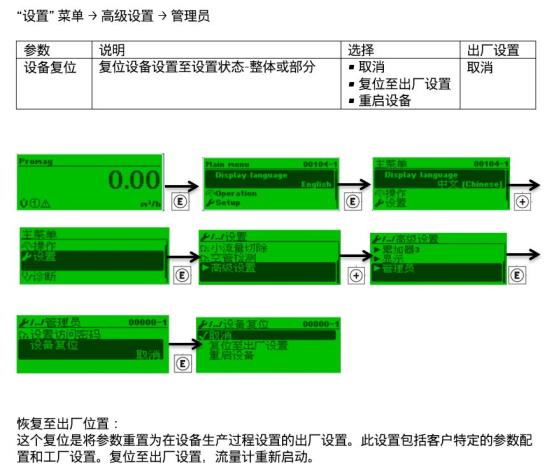
Three Methods to Restore Factory Settings
Depending on site conditions and instrument configuration, any of the following methods can be selected to restore factory settings.
Method 1: Operation via Local Display Unit
Suitable for Promag 400 with an on-site display module, intuitive operation, no additional tools required.
- Ensure the instrument is in measurement mode, press the E key to enter the main menu.
- Use the + or - keys to navigate to "Setup" → "Advanced Setup" → "Factory Reset".
- Press the E key to confirm, the screen prompts "Restore factory settings?".
- Select "OK" and enter the authorization password (default 0000).
- Wait for the instrument to restart, after restoration is complete it returns to the measurement interface.
Method 2: Operation via FieldCare Software
Suitable for Promag 400 supporting HART or PROFIBUS communication, enabling remote batch operations.
- Connect the computer to the instrument via Commubox FXA195 or fieldbus interface.
- Open FieldCare software and establish an online connection with the instrument.
- In the navigation tree, select "Device Functions" → "Reset" → "Factory Reset".
- Click "Execute" and confirm the warning prompt.
- Wait for the progress bar to complete, the instrument automatically restarts.
Method 3: Reset via Fieldbus Command
Suitable for PROFIBUS PA or FOUNDATION Fieldbus systems, where the control system issues the reset command.
- In the control system (such as DCS), open the device description file corresponding to the instrument.
- Locate the "Reset" parameter and write the factory reset code (usually 1 or 2).
- Confirm the write, the instrument will execute the reset and reinitialize.
Parameter Comparison Before and After Factory Reset
Restoring factory settings will reset most parameters, but some calibration data may be retained. The table below lists changes in common parameters.
| Parameter Category | Before Reset (Example) | After Reset (Factory Value) |
|---|---|---|
| Measurement Unit | m³/h | m³/h (depends on nominal diameter) |
| Upper Range Value | Custom value | Sensor nominal range |
| Damping Time | 5 s | 1 s |
| Empty Pipe Detection | On | Off |
| Low Flow Cutoff | 0.5% | 0% |
| Calibration Factor | Field calibration value | Retained (not reset) |
Precautions and Common Issues
Before restoring factory settings, be sure to read the following points to avoid data loss or measurement interruption.
- Back up parameters: It is recommended to record the current configuration via FieldCare or the display unit, so that it can be quickly reconfigured after restoration.
- Affects measurement: During the reset process, the instrument output may be interrupted; ensure the process is in a safe state.
- Password protection: If a custom password has been set, the correct password must be entered to execute the reset.
- Calibration data: Sensor calibration factors are usually not affected, but transmitter parameters will be reset.
- Version differences: Menu paths may vary slightly between different firmware versions; please refer to the corresponding manual.
Common Issues
- Measurement still abnormal after reset: Check sensor wiring, grounding, and medium conductivity; recalibrate if necessary.
- Forgot password: Try the default password 0000, or contact the manufacturer for a super password.
- Reset failed: Confirm the instrument power supply is stable, the communication interface is correctly connected, and retry after restarting.
Summary
Promag 400 factory reset can be completed through local display, FieldCare software, or fieldbus. Before operation, be sure to back up parameters and note the impact of reset on measurement output.
Correctly executing the reset can solve most parameter configuration issues. If the fault persists, it is recommended to contact Endress+Hauser technical support for in-depth diagnosis.