
Promag 400 Totalizer Reset to Zero Operation Guide
The Promag 400 is a commonly used electromagnetic flowmeter in industrial sites, and its totalizer function is used to measure the total flow of fluid in the pipeline. In scenarios such as equipment maintenance, batch switching, or data calibration, it is often necessary to reset the totalizer to zero. This article will introduce the correct reset operation method step by step.
1. Preparation Before Reset
Before performing the reset operation, the following conditions must be confirmed to avoid data loss or process abnormalities caused by misoperation.
- Confirm that the current totalizer data has been recorded or does not need to be retained.
- Ensure that the flowmeter is in measurement mode, not in configuration or maintenance mode.
- Prepare operation permissions: some models require entering an access password (default is usually 0000).
- Notify relevant process personnel to avoid affecting production statistics.
2. Totalizer Reset to Zero Steps
The Promag 400 supports resetting via the local display unit or debugging software. The following uses local operation as an example; the specific menu path may vary slightly depending on the firmware version.
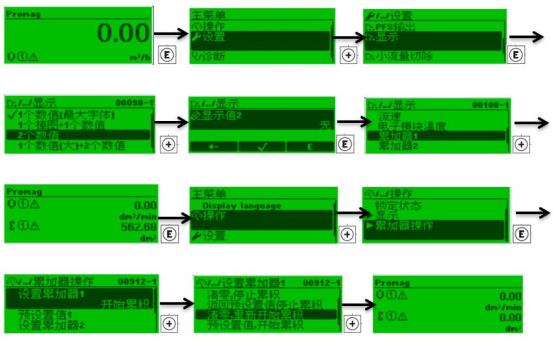
- Press the E key to enter the main menu.
- Use the + or - keys to select the "Operation" or "Maintenance" menu, and press E to confirm.
- Select the "Totalizer" submenu.
- Select "Reset totalizer".
- Press the E key to confirm the reset; the screen displays "Done" or the value returns to zero.
- Press the ESC key to return to the measurement interface.
If using debugging software (such as FieldCare), the totalizer reset option can be found in the corresponding device menu, and the operation logic is the same.
3. Key Parameters and Precautions
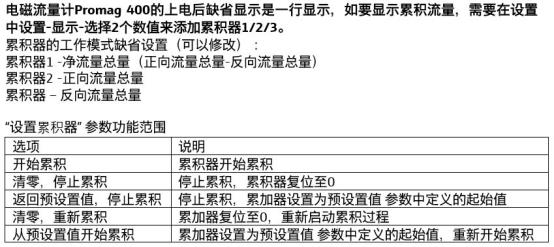
Different models of the Promag 400 may have slight differences in the reset function. The following table lists common parameter comparisons.
| Item | Description |
|---|---|
| Reset method | Local keys, remote communication, debugging software |
| Access password | Default 0000, modifiable |
| Reset impact | Only clears the totalized value, does not affect instantaneous flow and configuration |
| Data retention | The totalized value is usually retained after power failure unless manually reset |
Note: The reset operation cannot be undone, so be sure to execute it after confirmation. If the totalizer is involved in trade settlement or batch control, it is recommended to record the current value first.
4. Common Problems and Troubleshooting
If the totalizer does not return to zero after reset or cannot be operated, refer to the following troubleshooting directions.
- Check whether it is in write protection status; the correct password must be entered.
- Confirm whether the menu path is correct; some versions require operation under the "Expert" menu.
- If using remote communication, check whether the communication link is normal.
- If the value still shows the old value after reset, try powering off and restarting or restoring factory settings (operate with caution).
If the problem persists, it is recommended to contact the manufacturer's technical support or consult the detailed manual for the corresponding model.