
Promass 80 Totalizer Reset to Zero Overview
Promass 80 is a Coriolis mass flowmeter launched by Endress+Hauser, widely used for flow measurement in chemical, food, pharmaceutical, and other industries. In batch metering, equipment maintenance, or after calibration, the totalizer often needs to be reset to zero to ensure the accuracy of measurement data.
The zeroing operation itself is not complicated, but it involves parameter access permissions and safety confirmation. The current status of the instrument should be fully understood before operation.
Preparation Before Reset to Zero
Confirm Whether the Zeroing Conditions Are Met
- Confirm that there are no ongoing batch or trade settlement metering tasks;
- Confirm that the totalizer data has been recorded or uploaded to the host system;
- Confirm that the instrument is in measurement mode rather than in a fault alarm state.
Permission and Tool Preparation
- If operating through the on-site display panel, the access code must be entered (usually the factory default value; consult the manufacturer or administrator);
- If operating remotely via HART, PROFIBUS PA, or Modbus, prepare a handheld communicator or commissioning software;
- It is recommended to back up the current totalizer value in advance for future traceability.
Promass 80 Totalizer Reset to Zero Operation Steps
Method 1: On-Site Display Panel Operation
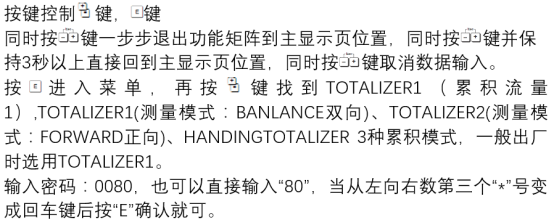
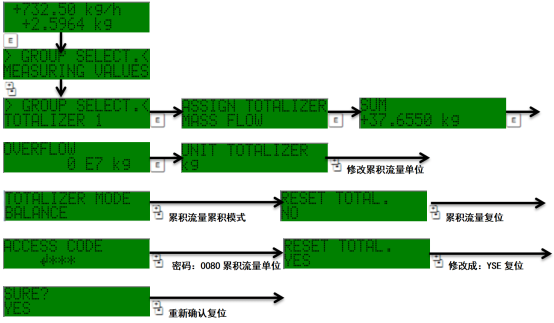
- Press the E key to enter the main menu, and use the +/- keys to select the "Operation" or "Totalizer" menu item;
- Find the "Totalizer reset" or "Reset totalizer" option;
- Press the E key to confirm. The screen will prompt whether to execute the reset; select "Yes";
- After the reset is complete, return to the measurement interface and confirm that the totalizer value has returned to zero.
Method 2: Remote Communication Operation
- Establish a communication connection with the instrument via a HART handheld communicator or commissioning software;
- Enter the "Totalizer" parameter group;
- Execute the "Reset" command and write the reset instruction;
- Read the totalizer value to confirm that it has been zeroed.
Operation Interface and Menu Schematic
[Click the image to enlarge]
[Click the image to enlarge]
Common Problems and Precautions
Common Problems
| Symptom | Possible Cause | Recommended Action |
|---|---|---|
| Cannot enter the reset menu | Incorrect access code or insufficient permission | Verify the access code and contact the administrator |
| Value does not return to zero after reset | Operation not confirmed or communication interrupted | Re-execute the reset and confirm the write |
| Reset option is grayed out and unavailable | The instrument is in alarm or locked state | Clear the alarm and try again |
Precautions
- The reset operation will permanently clear the current totalizer value; be sure to confirm that the data has been backed up before operation;
- Zeroing in trade settlement scenarios should comply with relevant metrology regulations and be properly recorded;
- If the instrument has a totalizer lock function, it must be unlocked before performing the reset.
Summary
The Promass 80 totalizer reset to zero can be completed through the on-site panel or remote communication. The key lies in permission confirmation and data backup. By following the above steps, zeroing can be completed quickly and safely, ensuring accurate and reliable subsequent measurement.