
Promass 80 Density Adjustment Overview
Promass 80 is a high-performance mass flowmeter launched by KROHNE, based on the Coriolis principle, and can directly measure mass flow, density, and temperature. Density adjustment is a key step to ensure its measurement accuracy, especially after changes in medium characteristics or long-term use.
This article is intended for engineering technicians and procurement personnel, providing a standardized operation guide for Promass 80 density adjustment, covering preparation work, operating steps, parameter settings, and precautions.
Preparation Before Density Adjustment
Tools and Conditions
- Confirm that the flowmeter is correctly installed and powered on, the pipeline is filled with medium, and it is in a stable state.
- Prepare a standard density reference liquid or an actual medium with known density.
- Obtain device operation permissions (if a password is required, please refer to the manual).
- Record the current density parameters as a backup.
Safety Precautions
- Ensure process safety before adjustment to avoid leakage or pressure shock.
- When operating in hazardous areas, follow relevant safety regulations.
- It is recommended to perform density adjustment at zero flow or stable flow.
Promass 80 Density Adjustment Steps
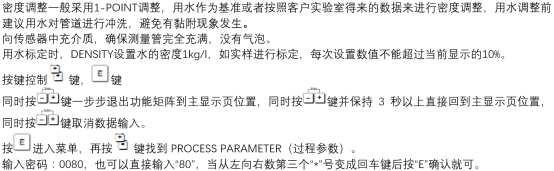
Enter the Density Adjustment Menu
- Enter the main menu through the local display or handheld operator.
- Select the "Diagnostics/Service" or "Parameter Settings" menu.
- Find the "Density Adjustment" or "Density Calibration" option.
- Enter the password (the default is usually "0000" or refer to the manual).
Perform Density Adjustment
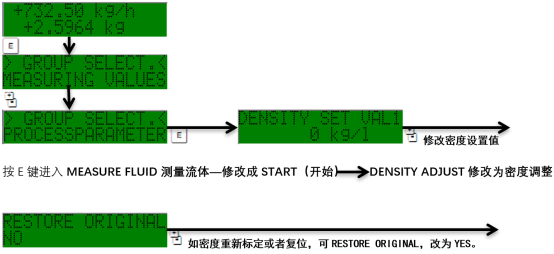
- Select the "Density Adjustment" function; the system prompts the current density value.
- Switch the medium to a standard density reference liquid or ensure the medium density is known.
- Enter the reference density value (unit: kg/m³).
- After confirmation, the flowmeter automatically calculates and stores the new density coefficient.
- Save the settings and exit the menu.
Verify the Adjustment Result
- Return to measurement mode and observe whether the density display value matches the reference value.
- If the deviation is large, repeat the adjustment or check the medium state.
- Record the adjusted parameters for future traceability.
Density Adjustment Parameters and Common Problems
Key Parameter Description
| Parameter | Description | Typical Value/Range |
|---|---|---|
| Density coefficient | Used to correct density measurement | According to calibration results |
| Reference density | Density of the standard liquid or known medium | e.g., 1000 kg/m³ (water) |
| Temperature compensation | Automatically corrects density based on temperature | Enabled/Disabled |
Common Problems and Solutions
- The density is still inaccurate after adjustment: Check whether the medium fills the pipeline, whether there are bubbles, or recalibrate.
- Unable to enter the adjustment menu: Confirm the password is correct, or contact the manufacturer for permission.
- The density value fluctuates greatly: This may be due to unstable flow or uneven medium; it is recommended to adjust under stable working conditions.
Summary
Promass 80 density adjustment is an important maintenance operation to ensure the long-term accurate operation of the flowmeter. Following the above steps can effectively improve measurement reliability. Regular calibration is recommended, and adjustment records should be saved for traceability and optimization.