
Promass 83 Totalizer Reset to Zero Overview
Promass 83 is a high-precision Coriolis mass flowmeter launched by Endress+Hauser, widely used for mass flow, volume flow, and density measurement in industrial processes. Totalizer reset to zero is a common operation in daily maintenance and batch control, used to reset the accumulated value to zero so that measurement can start again.
Correctly performing the reset operation ensures accurate flowmeter data and avoids production deviations caused by incorrect accumulated values. This article will introduce in detail the steps and precautions for Promass 83 totalizer reset to zero.
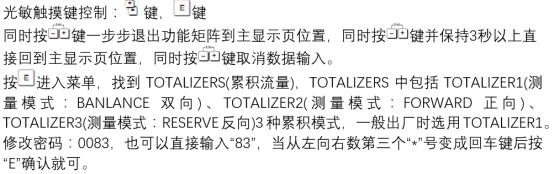
Preparation Before Reset to Zero
Before performing totalizer reset, the following conditions must be confirmed to ensure safe and effective operation.
Safety and Permission Confirmation
- Ensure the process is in a safe state and the reset operation will not affect production.
- Confirm that the operator has the corresponding permissions, usually requiring a password or switching to maintenance mode.
- Record the current accumulated value for later comparison or audit.
Tools and Documentation Preparation
- Prepare the Promass 83 operation manual and refer to the menu structure of the specific model.
- If using the local display, ensure the display screen is clear and readable; if using commissioning software such as FieldCare, ensure the connection is normal.
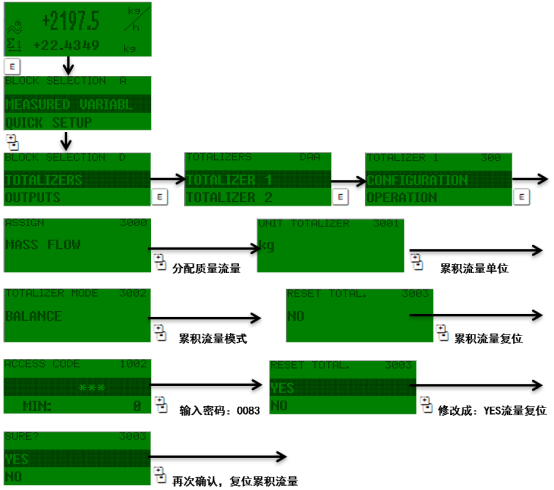
Totalizer Reset to Zero Operation Steps
Promass 83 provides multiple reset methods, including via local display, commissioning software, or digital communication. The following uses local display operation as an example to introduce the general steps.
Reset via Local Display
- Enter the main menu and select "Operation" or "Process Parameters".
- Find the "Totalizer" or "Accumulator" option.
- Select "Reset" or "Clear", and confirm the operation.
- Select whether to reset all accumulated values or a single accumulated value as needed.
- Enter the password if required, and confirm execution.
Reset via Commissioning Software or Communication
- Use software such as FieldCare to connect to the device, and find the totalizer reset option in the parameter tree.
- Write the reset command through communication protocols such as HART, PROFIBUS, or Modbus.
- Refer to the communication manual for the specific register address or command.
Precautions and Common Issues for Reset to Zero
Although the reset operation is simple, the following precautions should be noted to avoid incorrect operation.
Precautions
- Before resetting, ensure the accumulated value has been recorded or is no longer needed.
- Some models may need to reset both the total and batch accumulated values at the same time.
- After reset, the accumulated value starts from zero, and the flowmeter continues normal measurement.
Common Issues
| Issue | Possible Cause | Solution |
|---|---|---|
| Unable to reset | Insufficient permissions or incorrect password | Check permissions and enter the correct password |
| Value does not change after reset | Execution not confirmed or communication failed | Operate again and check the communication connection |
| Reset option is grayed out | Device is locked | Unlock the device or contact the administrator |
Summary
Promass 83 totalizer reset to zero is a basic operation in maintenance and batch control. It can be implemented through the local display, commissioning software, or communication, and attention must be paid to permissions and confirmation steps during operation. Correct reset ensures long-term stable operation of the flowmeter and provides reliable data for process control.