
Promass 300/500 Medium Type Modification Operation Guide
Promass 300/500 is a high-performance Coriolis mass flowmeter launched by Endress+Hauser, widely used in chemical, petroleum, pharmaceutical and other industries. In actual use, depending on process changes, it may be necessary to modify the medium type measured by the instrument. This article will introduce in detail the steps and precautions for modifying the medium type, helping engineering technicians quickly complete the setup.
1. Preparation Before Modification
Before modifying the medium type, please ensure that the following preparations have been completed to avoid operational errors or instrument damage.
- Confirm that the current process medium has stopped flowing or is in a safe state.
- Record the current instrument parameters so they can be restored if needed.
- Ensure you have operator or expert authority to access the relevant menus.
- Prepare the relevant physical property parameters of the medium, such as density and viscosity (if manual input is required).
2. Steps to Modify the Medium Type
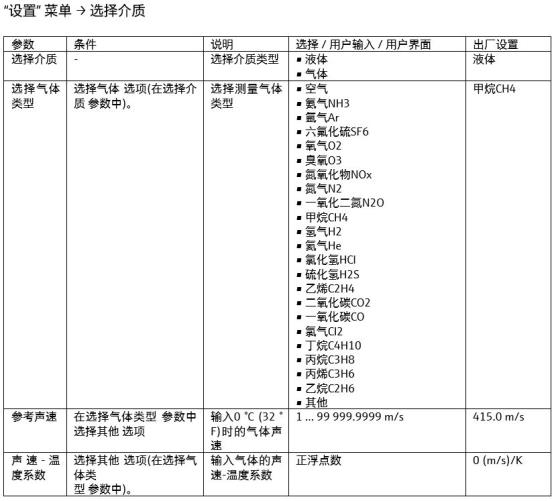
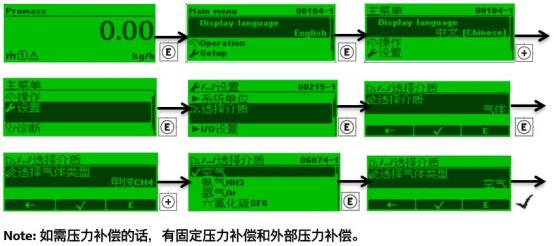
The medium type setting of Promass 300/500 is usually located in the "Medium" submenu under the "Setup" menu. The specific operation steps are as follows:
- Enter the instrument main menu via the local display or commissioning software (such as FieldCare, DeviceCare).
- Select "Setup" → "Advanced setup" → "Medium".
- In the "Medium type" option, select the medium that matches the actual process, such as liquid, gas, or steam.
- If the medium is a liquid, you also need to select the specific liquid type (such as water, alcohol, etc.), or select "Other" and manually enter the density.
- After confirming the modification, save the settings and exit the menu.
- Check whether the instrument measurement values are normal, and perform zero point calibration if necessary.
3. Precautions and Common Problems
When modifying the medium type, pay attention to the following matters to ensure measurement accuracy and instrument service life.
- The medium type must be consistent with the actual process, otherwise it will cause measurement errors or alarms.
- For gas measurement, ensure that the pressure and temperature compensation parameters are set correctly.
- After modification, it is recommended to perform zero point calibration to eliminate the influence of factors such as installation stress.
- If the medium type involves a hazardous area, ensure that the instrument explosion-proof rating meets the requirements.
4. Parameter Comparison and Recommended Settings
The typical parameter setting comparison for different medium types is as follows, for reference by engineering technicians.
| Medium Type | Density Input Method | Typical Application | Precautions |
|---|---|---|---|
| Liquid | Select preset liquid or manual input | Water, chemicals, oil products | Pay attention to the influence of temperature on density |
| Gas | Need to input reference density or components | Natural gas, compressed air | Pressure and temperature compensation must be set |
| Steam | Need to input steam parameters | Saturated steam, superheated steam | Ensure the steam state is stable |
5. Summary
Modifying the medium type of Promass 300/500 is a routine but important operation. Correctly setting the medium type can ensure high-precision measurement of the flowmeter and extend the service life of the instrument. It is recommended that trained personnel perform the operation and verify the measurement results after modification. If further assistance is needed, please contact Endress+Hauser technical support.