
Promass 10 Main Menu Overview
Promass 10 is a Coriolis mass flowmeter launched by Endress+Hauser, widely used for flow measurement in chemical, petroleum, food, and other industries. Its main menu is the core entry point for on-site operation and parameter configuration.
Through the main menu, users can quickly access measured values, diagnostic information, setup wizards, and advanced parameters. Based on actual interface screenshots, this article systematically sorts out the hierarchy and operating points of the main menu.
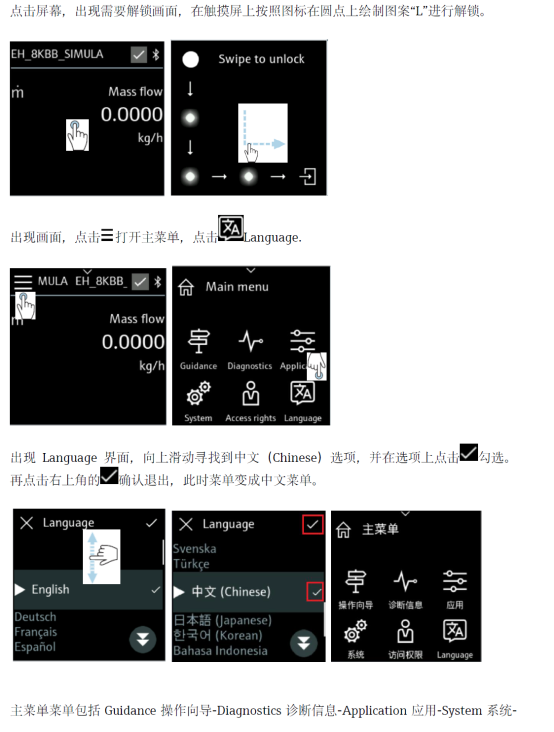
Main Menu Hierarchy and Functional Modules
The main menu of Promass 10 adopts a hierarchical tree structure, making it easy for users to navigate level by level. The main functional modules are as follows:
- Measured values: Displays process variables such as mass flow, volume flow, density, and temperature in real time.
- Diagnostics: View device status, alarm information, and history records, supporting troubleshooting.
- Setup: Includes wizard-based parameter configuration, such as units, range, and output signals.
- Advanced setup: Adjusts filtering, empty pipe detection, zero calibration, etc. for special applications.
Each module is further divided into multiple submenus, which users can select via arrow keys or touchscreen.
Detailed Explanation of Key Menu Items
Measured Values Menu
This menu centrally displays all process variables and supports multi-line display and unit switching. Engineering personnel can quickly confirm whether the flow is normal here.
- Mass flow: Directly outputs kg/h or t/h.
- Volume flow: Requires input of reference density for volume settlement.
- Density and temperature: Assist in judging medium status.
Setup Wizard
The setup wizard simplifies the initial commissioning process, guiding users step by step to complete language, unit, output, and other configurations. It is recommended to operate in the following order:
- Select language and unit system.
- Set range and damping time.
- Configure current output or pulse output.
- Confirm and save parameters.
Diagnostics and Maintenance
The diagnostics menu provides device self-test results and alarm lists. If E or F class alarms occur, refer to the manual based on the prompt code.
Regularly checking diagnostic information helps with preventive maintenance and reduces unplanned downtime.
Menu Parameter Comparison and Operating Recommendations
The following table compares typical setting ranges for commonly used parameters in the main menu, for reference by engineering technicians and procurement.
| Parameter | Typical Range | Description |
|---|---|---|
| Mass flow unit | kg/h, t/h, g/s | Select according to process requirements |
| Damping time | 0~100 s | Suppress output fluctuations |
| Current output range | 4~20 mA | Corresponds to lower/upper range limit |
| Empty pipe detection | On/Off | Prevent false empty pipe alarms |
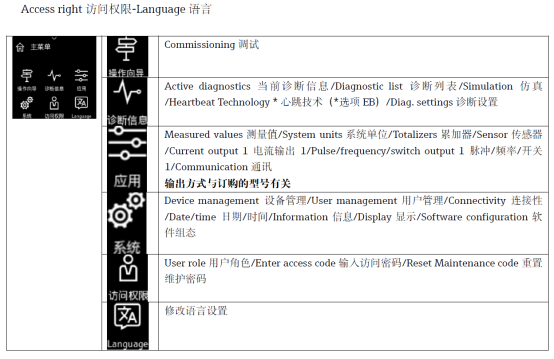
Operating Precautions
- Before modifying parameters, it is recommended to record the original values for easy restoration.
- When performing zero calibration, ensure the pipe is full and the fluid is stationary.
- Select "Save" when exiting the menu, otherwise changes will be invalid.
- If the menu responds slowly, check the power supply and signal cable connections.
Mastering the Promass 10 main menu overview can significantly improve on-site commissioning and maintenance efficiency, ensuring stable and reliable flow measurement.