
Prowirl 72/73 Cumulative Flow Reset Overview
Prowirl 72/73 is a vortex flowmeter launched by Endress+Hauser, widely used in industrial flow measurement. Resetting the cumulative flow to zero is a common operation in daily maintenance, used to reset the cumulative flow value to zero for re-measurement or calibration. This article is based on the official operation manual and organizes the complete reset-to-zero process.
Preparation Before Operation
Tools and Conditions
- Confirm that the instrument is powered on and not in measurement alarm or fault mode.
- Prepare a HART communicator or FieldCare/DeviceCare configuration software, or operate through the local display panel.
- Record the current cumulative flow value for later comparison or auditing.
Safety Precautions
- The reset operation does not affect the current instantaneous flow measurement, but it will clear the cumulative value. Please confirm that historical data does not need to be retained.
- If the instrument is used for trade settlement, authorization from relevant parties must be obtained before resetting.
Reset-to-Zero Operation Steps
Operation via Local Display Panel
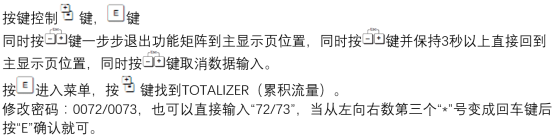
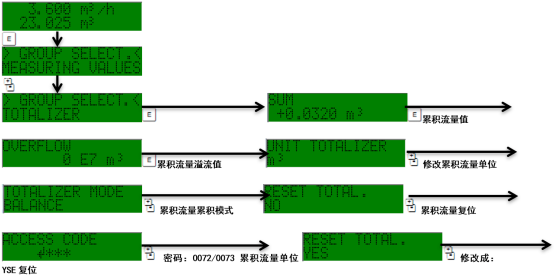
- Press the E key to enter the main menu.
- Use the + or - keys to select the "Operation" menu, then press E to confirm.
- Select the "Cumulative Flow Reset" option and press E to enter.
- The screen prompts "Confirm reset?". Select "Yes" and confirm.
- The cumulative flow value is reset to zero, and the main interface is returned to.
Operation via HART Communicator
- Connect the communicator to the instrument's 4-20 mA loop.
- Enter the "Device Setup" > "Cumulative Flow" menu.
- Select "Reset Cumulative Flow" and execute the reset command.
- Confirm that the reset is successful; the cumulative value displays as 0.

Common Issues and Precautions
Possible Reasons for Reset Failure
| Symptom | Possible Cause | Solution |
|---|---|---|
| Cannot enter the reset menu | The instrument is in write-protected state | Enter the password or disable write protection |
| Cumulative value does not reset to zero after reset | The operation was not confirmed or communication was interrupted | Re-execute the reset and confirm |
| Error code displayed | Instrument fault or parameter conflict | Refer to the manual to troubleshoot |
Best Practice Recommendations
- After resetting, record the operation time and operator for traceability.
- Regularly back up cumulative flow data to avoid accidental loss.
- If frequent resets are required, it is recommended to check whether there is an abnormality in the process.
Summary
The Prowirl 72/73 cumulative flow reset-to-zero operation is simple, but attention must be paid to permissions and data security. It can be completed through the local panel or HART communicator. Following the above steps ensures accurate and reliable operation. For more detailed parameter settings, please refer to the official technical manual.