
Overview of Modifying Operating Density for Prowirl 72
Prowirl 72 is a vortex flowmeter launched by Endress+Hauser, widely used for flow measurement of steam, gases, and liquids. During measurement, operating density is one of the key parameters affecting measurement accuracy. When the actual medium density under operating conditions differs from the instrument's set value, the operating density must be modified to ensure the accuracy of flow calculation.
This article will detail the specific steps, precautions, and common issues for modifying the operating density of the Prowirl 72, helping engineering technicians and procurement personnel quickly master the operation method.
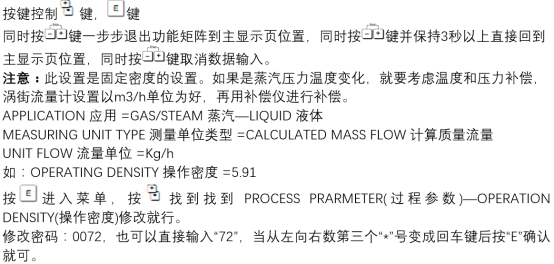
Importance of the Operating Density Parameter
Operating density directly participates in the mass flow calculation of the vortex flowmeter. If the density setting is incorrect, it will cause significant deviations in measurement results, affecting process control and trade settlement.
Factors Affecting Measurement Accuracy
- Medium temperature: Temperature changes cause density changes and require real-time compensation.
- Medium pressure: Pressure fluctuations also affect density, especially in gas measurement.
- Medium composition: Changes in composition alter density and require adjustment based on actual operating conditions.
Difference Between Operating Density and Standard Density
| Parameter | Definition | Application Scenario |
|---|---|---|
| Operating density | Medium density under actual operating conditions | Directly involved in mass flow calculation |
| Standard density | Density under standard conditions (0°C, 101.325 kPa) | Used for trade settlement and comparison |
Steps to Modify Operating Density
The following steps are applicable for local display operation of the Prowirl 72 or operation via FieldCare/DeviceCare software.
Modification via Local Display
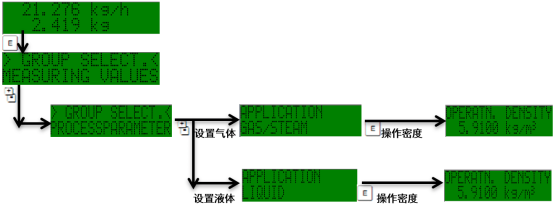
- Enter the main menu, select "Setup" → "Advanced setup" → "Sensor" → "Density".
- Select the "Operation density" parameter.
- Enter the new operating density value and press the "E" key to confirm.
- Return to the main interface and check whether the measured value is normal.
Modification via Configuration Software
- Connect the Prowirl 72 to FieldCare or DeviceCare.
- Open "Expert" → "Sensor" → "Density" in the navigation tree.
- Modify the "Operation density" value and write it to the device.
- Save the parameters and restart the device to make the settings effective.
Precautions and Common Issues
Preparation Before Modification
- Confirm the current operating conditions: temperature, pressure, and medium composition.
- Consult the medium property table to obtain accurate operating density values.
- Record the original parameters for restoration in case of issues.
Common Issues
- Measurement value still deviates greatly after modification: Check whether temperature and pressure compensation are also correctly set.
- Unable to modify parameters: Confirm whether the device is in write-protected state; a password or unlock may be required.
- Density value out of range: Ensure the input value is within the instrument's allowable range (refer to the technical manual).
Summary
Correctly modifying the operating density of the Prowirl 72 is a key step to ensure flow measurement accuracy. It can be done via local display or configuration software. During operation, attention must be paid to the consistency of operating condition parameters and the device's write-protection status. Regularly calibrating the operating density can effectively improve the reliability of process control.