
Prowirl 72 Pulse Output Setup Overview
Prowirl 72 is a vortex flowmeter launched by Endress+Hauser and is widely used in industrial flow measurement. Pulse output is one of its important functions, used to convert flow signals into pulse signal output for easy connection with PLCs, counters, and other devices. Correctly setting the pulse output is key to ensuring measurement accuracy.
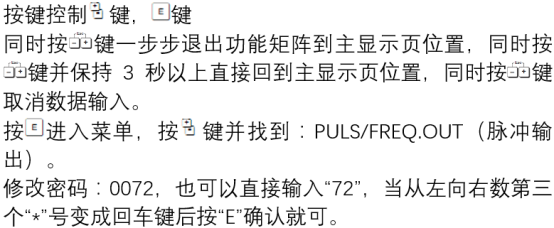
Preparation Before Setup
Hardware Connection
- Ensure that the Prowirl 72 is correctly installed and powered on.
- Connect the pulse output terminals (usually terminals 24 and 25) to the external device.
- Check that the cable shield is grounded to avoid electromagnetic interference.
Parameter Confirmation
- Confirm that the flowmeter has been configured and that parameters such as flow unit and measuring range are correct.
- Understand the flow equivalent corresponding to the pulse output (e.g., 1 pulse = 1 L).
Pulse Output Setup Steps
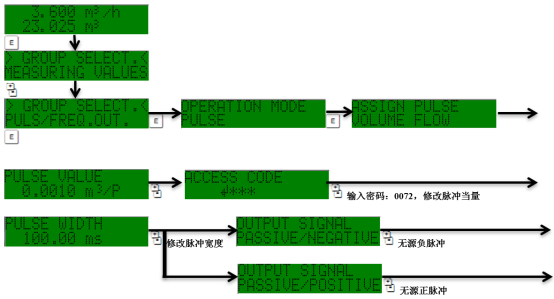
Enter the setup menu through the local display or commissioning software (such as FieldCare), and proceed as follows:
- Enter the main menu and select "Setup" > "Output".
- Select the "Pulse Output" option.
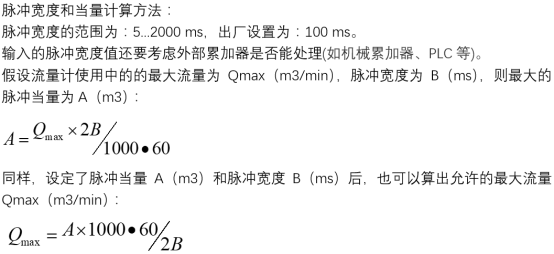
- Set the pulse equivalent: enter the flow value represented by each pulse (e.g., 0.1 L/pulse).
- Set the pulse width: usually 0.1 ms, 1 ms, 10 ms, etc. can be selected, and it must match the external device.
- Set the output mode: select "active" or "passive" according to the requirements of the external device.
- Save the settings and exit.
Parameter Descriptions and Recommended Values
| Parameter | Description | Recommended Value |
|---|---|---|
| Pulse equivalent | Flow volume corresponding to each pulse | Set according to the measuring range and counter requirements |
| Pulse width | Duration of the pulse high level | 1 ms (general) |
| Output mode | Active/passive | Select according to the input type of the external device |
Common Issues and Precautions
- Pulse loss: Check whether the pulse width is too small and whether the external device responds fast enough.
- Signal interference: Ensure that the cable shield is well grounded and keep it away from power cables.
- Parameters not taking effect: After modifying parameters, save them and restart the flowmeter.
- Pay attention to the maximum frequency limit of the pulse output to avoid exceeding the processing capability of the external device.
After correctly setting the pulse output, verify whether the pulse count is accurate by simulating flow or actual flow. If you have any questions, please refer to the Prowirl 72 manual or contact technical support.