
Overview of Prowirl 73 Current Output Range Setting
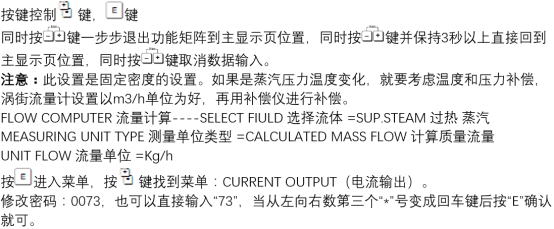
Prowirl 73 is a vortex flowmeter launched by Endress+Hauser, widely used for flow measurement in working conditions such as superheated steam. In actual engineering, the flow measurement value needs to be transmitted to the DCS or PLC system via a 4-20mA current output.
Correctly setting the current output range is a key step to ensure the accurate correspondence between the signal and the actual flow. This article introduces the range setting method and precautions under superheated steam conditions.
Preparation Before Setting
Confirm Working Condition Parameters
Before setting the range, it is necessary to first confirm the actual working condition parameters of the superheated steam, including temperature, pressure, and flow range. These parameters directly affect the setting values of the upper and lower range limits.
- Confirm the maximum flow and minimum flow values
- Confirm whether the steam temperature and pressure are within the allowable range of the instrument
- Confirm that the output signal type is 4-20mA
Enter the Parameter Setting Menu
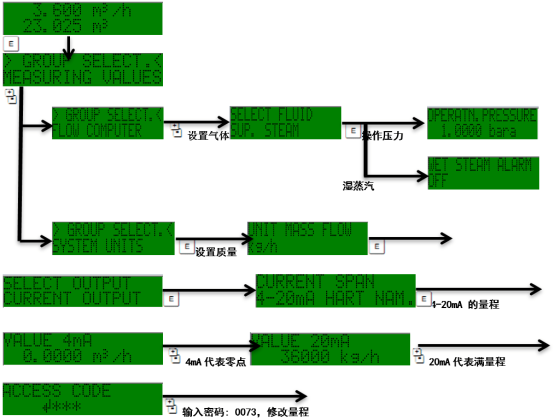
Enter the parameter setting menu of Prowirl 73 through the on-site operation panel or debugging software. Usually, the corresponding access password needs to be entered to modify current output-related parameters.
Current Output Range Setting Steps
Operation Procedure
- Enter the "Output" or "Current Output" menu item
- Select Current Output 1 or the corresponding output channel
- Set the 4mA corresponding value (lower range limit, usually 0 or minimum flow)
- Set the 20mA corresponding value (upper range limit, i.e., maximum flow)
- Confirm that the range unit is consistent with the engineering unit
- Save the settings and return to the main interface
After setting is completed, it is recommended to verify whether the correspondence between the current value and the flow value is correct through the analog output function.
Range Parameter Correspondence
The following table lists the typical correspondence between current output and flow value for reference during setting:
| Output Current | Corresponding Flow | Description |
|---|---|---|
| 4 mA | Lower range limit | Usually set to 0 or minimum measurable flow |
| 12 mA | Middle range value | Approximately 50% of full scale |
| 20 mA | Upper range limit | Corresponds to maximum flow |
Precautions and Common Issues
Setting Key Points
- The upper range limit should be slightly greater than the actual maximum flow to avoid signal saturation
- Under superheated steam conditions, temperature and pressure compensation will affect the actual flow calculation
- After modifying the range, the low flow cutoff setting needs to be reconfirmed
- Ensure that the receiving range on the DCS side is consistent with the setting on the instrument side
Troubleshooting Common Issues
If the output current does not match expectations, check whether the range setting has been accidentally changed, whether the wiring is correct, and whether there is an alarm status. If necessary, verify point by point through the simulation output function.
For superheated steam measurement, it is recommended to regularly check the temperature and pressure compensation parameters to ensure that the current output reflects the true steam mass flow.