
Prowirl 200 Factory Reset Overview
Prowirl 200 is a high-performance vortex flowmeter launched by Endress+Hauser, widely used for flow measurement of steam, gases, and liquids. When instrument parameters are accidentally modified, abnormal alarms occur, or re-commissioning is required, factory reset is a quick and effective solution.
Factory reset will reset all writable parameters to factory default values, but will not clear the accumulated flow total. Before operation, be sure to record key parameters such as pipe inner diameter, calibration coefficient, output configuration, etc.
Prerequisites for Factory Reset
Safety and Permission Requirements
- Ensure the process has been stopped or is in a safe state to avoid affecting production due to misoperation.
- Instrument operation permission is required, usually requiring entry of the access code (default 0000 or user-defined).
- It is recommended to use FieldCare or DeviceCare software for backup so that parameters can be reloaded after reset.
Parameters to Record
- Sensor calibration coefficient (K-factor) and pipe inner diameter.
- Range and direction of current output, pulse output, and frequency output.
- Totalizer, alarm thresholds, and communication address (such as PROFIBUS PA, Modbus, etc.).
Factory Reset Operation Steps
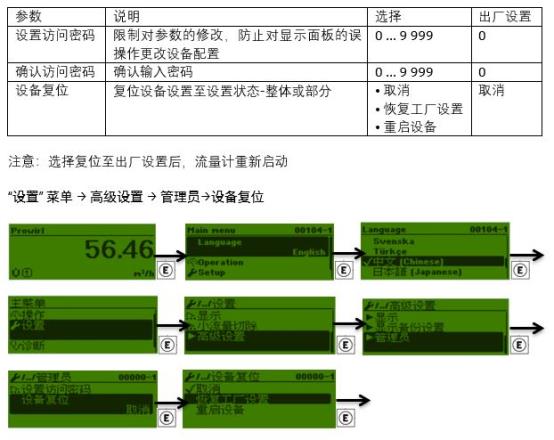
Method 1: Operation via Local Display Unit
- Power on the instrument and wait for startup to complete.
- Press the E key to enter the main menu, use the + or - keys to select "Setup".
- Enter "Advanced setup" and select "Reset".
- Select "Reset to factory default".
- Enter the access code (default 0000) and confirm execution.
- The instrument automatically restarts, and all parameters are restored to factory values.
Method 2: Operation via FieldCare Software
- Connect the computer to the instrument (service interface or fieldbus).
- Launch FieldCare, establish a connection, and enter "Device configuration".
- In the "Reset" function, select "Factory reset".
- Click execute and wait for the instrument to restart.
Method 3: Reset via Fieldbus Command
For PROFIBUS PA or Modbus versions, a reset command can be sent via the bus. Refer to the corresponding communication manual for specific command codes. After reset, the bus address and parameters need to be reconfigured.
Necessary Checks After Factory Reset
Parameter Reconfiguration
- Check whether the pipe inner diameter and calibration coefficient match the site conditions.
- Reset the output signal type and range.
- Configure communication parameters (address, baud rate, etc.).
- Set alarm limits and totalizer units according to process requirements.
Function Verification
- Observe whether the measured value is stable and compare it with the reference flow.
- Check whether the current output corresponds to the correct flow.
- Confirm there are no alarms or error messages.
Common Issues and Precautions
Will factory reset clear the totalizer?
No. Factory reset only resets parameters, and the totalizer is usually retained. However, some firmware versions may provide a "clear totalizer" option, which needs to be confirmed separately.
What should I do if the instrument cannot communicate after reset?
Factory reset will reset the communication address and baud rate. Please reconfigure the device address and communication parameters according to the network plan.
Will it affect calibration?
Factory reset will not change the physical calibration of the sensor, but it will reset the user calibration coefficient. If on-site calibration was previously performed, the calibration data needs to be re-entered.
Parameter Comparison Table
| Parameter Item | Factory Default Value | User Setting Example |
|---|---|---|
| Pipe inner diameter | DN25 | DN50 |
| Calibration coefficient | 1.0000 | 1.2345 |
| Current output range | 0-100 m³/h | 0-500 m³/h |
| Communication address | 126 | 10 |
Summary
Prowirl 200 factory reset is an effective means to solve parameter errors and commissioning issues. Before operation, be sure to record key parameters. After reset, reconfigure and verify to ensure accurate and reliable flow measurement. For more detailed steps, please refer to the official operation manual or contact Endress+Hauser technical support.