
Overview of Prowirl 73 System Unit Modification
Prowirl 73 is a high-performance vortex flowmeter launched by Endress+Hauser, widely used in industrial flow measurement. In practical applications, it may be necessary to modify the system units according to working conditions or user preferences. This article will detail the modification steps to help you quickly complete the settings.
Preparation Before Modification
Before modifying the system units, please ensure the following preparations are completed to avoid operational errors.
- Confirm that the instrument is powered on and in normal measurement mode.
- Prepare the operation manual or record the current parameters for recovery.
- Ensure you have operation permissions (if a password is required, obtain it in advance).
System Unit Modification Steps
Follow the steps below to complete the system unit modification of the Prowirl 73.
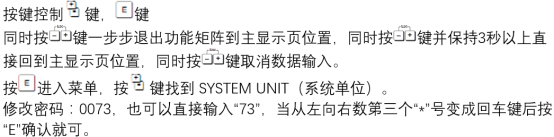
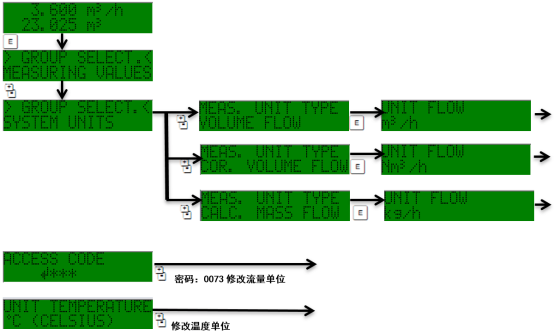
- Enter the main menu: Press the E key to enter the main menu, use the + or - keys to select the "Setup" menu.
- Select the "System units" option: Press the E key to enter, use the + or - keys to select "System units".
- Select the type of unit to modify: such as volume flow unit, mass flow unit, temperature unit, etc.
- Modify the unit: Press the E key to enter, use the + or - keys to select the target unit, press the E key to confirm.
- Save the settings: Press the E key to save, or press the ESC key to return to the previous menu.
Common Unit Options and Descriptions
The Prowirl 73 supports multiple units; the following are examples of common units.
| Unit Type | Available Units | Description |
|---|---|---|
| Volume Flow | m³/h, L/min, ft³/min | Select based on pipe size and medium |
| Mass Flow | kg/h, t/h, lb/min | Requires density setting |
| Temperature | °C, °F, K | Affects temperature compensation calculation |
| Pressure | bar, psi, kPa | Used for pressure compensation |
Precautions and Common Issues
When modifying units, please note the following to ensure measurement accuracy.
- After modifying units, check whether related parameters (such as range, alarm values) need to be adjusted simultaneously.
- If the display is abnormal after modification, you can restore factory settings or refer to the manual to reconfigure.
- It is recommended to record the original units before modification for future maintenance.
By following the above steps, you can easily complete the system unit modification of the Prowirl 73. For further assistance, please contact technical support.