
Product Overview
CLM223 is a cost-effective online conductivity/resistivity transmitter, suitable for industrial water treatment, chemical processes, and other scenarios. It can be paired with a variety of conductivity sensors to achieve continuous measurement and signal output.
CYK71 is a dedicated cable designed for conductivity measurement, used to connect sensors without cables such as CLS19, CLS15, CLS12, CLS13. Proper selection and wiring are key to ensuring measurement accuracy.
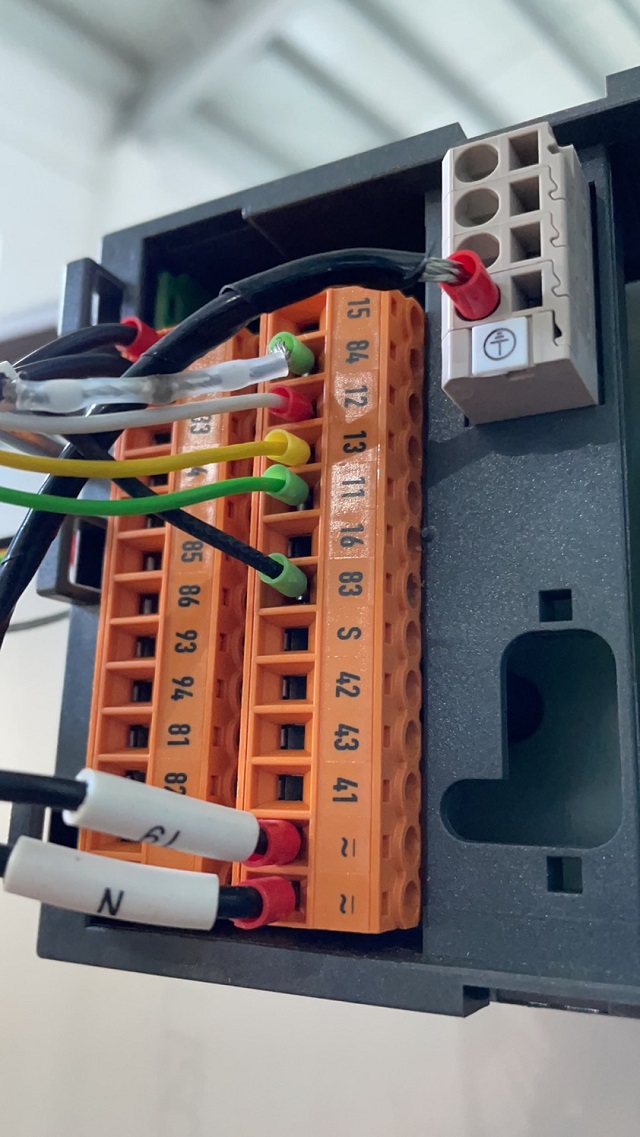
Compatible Sensors and Cables
Applicable Sensor Models
- CLS19: Standard conductivity sensor
- CLS15: General-purpose conductivity sensor
- CLS12: High-precision conductivity sensor
- CLS13: Corrosion-resistant conductivity sensor
The above sensors do not come with cables and must be used with the CYK71 cable.
Cable and Transmitter Matching
| Device | Model | Function |
|---|---|---|
| Transmitter | CLM223 | Conductivity/resistivity measurement and transmission |
| Cable | CYK71 | Connects sensor and transmitter |
| Sensor | CLS19/CLS15/CLS12/CLS13 | Conductivity signal acquisition |
Wiring Steps
Preparation
- Confirm that the transmitter CLM223 is powered off.
- Prepare the CYK71 cable and compatible sensor.
- Check the cable appearance to ensure it is not damaged.
Connecting the Sensor Side
- Connect the terminal of the sensor (e.g., CLS19) to the corresponding core wires of the CYK71 cable.
- The cable typically contains a coaxial core wire and a shielding layer. Distinguish the signal wire and shield wire according to the sensor manual.
- Tighten the waterproof connector to ensure sealing.
Connecting the Transmitter Side
- Connect the other end of the CYK71 cable to the sensor input terminals of the CLM223.
- Refer to the transmitter terminal definitions: generally, the core wire connects to the signal input, and the shielding layer connects to the ground terminal.
- Confirm that the wiring is secure to avoid short circuits.
Power-on Check
- After checking all wiring is correct, power on the CLM223.
- Observe whether the transmitter display is normal, and calibrate if necessary.
- If the display is abnormal, immediately power off and check the wiring.
Precautions
- Be sure to use the CYK71 dedicated cable to avoid signal attenuation.
- Keep wiring away from power cables during connection to reduce electromagnetic interference.
- Ensure that the connection between the sensor and cable is well sealed to prevent water ingress.
- For detailed terminal definitions, refer to the CLM223 and sensor manuals.