
Promass 83 Coriolis Mass Flowmeter Quick Setup Overview
The Promass 83 series Coriolis mass flowmeters support quick setup via optical touch keys, mainly configuring language, units, current output, and pulse output. Mastering the correct key operations and menu navigation can significantly shorten commissioning time. This article is intended for engineering technicians and procurement personnel, providing clear setup steps and operational points.
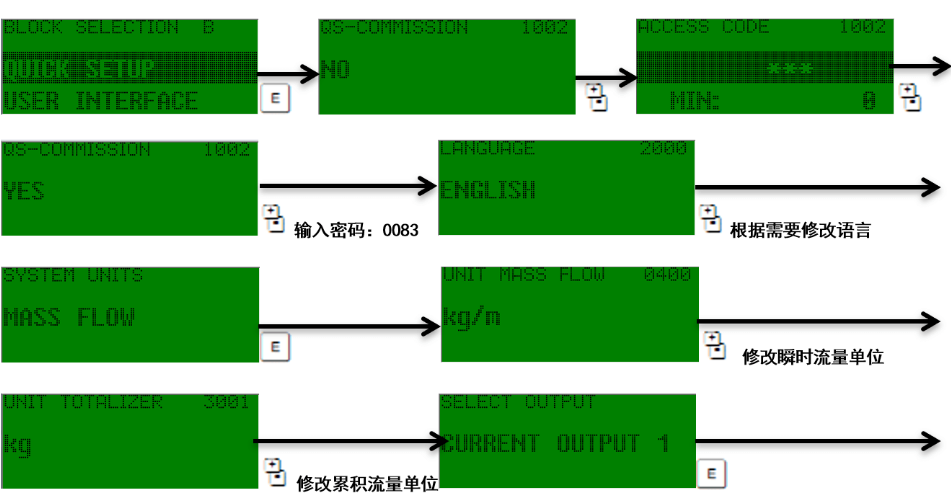
Basics of Optical Touch Key Operation
The instrument is equipped with three optical touch keys: "+", "-", and "E", used for menu navigation and parameter modification. Familiarity with the combination functions of these keys is a prerequisite for quick setup.
Key Function Description
- "+" key: Increase values or scroll up through menu items.
- "-" key: Decrease values or scroll down through menu items.
- "E" key: Enter menus, confirm selections, or save inputs.
Combination Key Shortcuts
- Press "+" and "-" simultaneously: Exit the function matrix step by step and return to the main display page.
- Press "+" and "-" simultaneously and hold for more than 3 seconds: Return directly to the main display page.
- Press "+" and "-" simultaneously: Cancel the current data input.
Quick Setup Steps
Follow the steps below to enter the quick setup menu and complete the necessary configuration. Ensure the instrument is on the main display page during operation.
- Press the "E" key to enter the function matrix menu.
- Use the "+" or "-" key to find the QUICKSETUP option.
- Press the "E" key to confirm and enter quick setup.
- Follow the prompts to set parameters such as language, units, current output, and pulse output in sequence.
- When changing the password, enter "0083" or directly enter "83".
- When the third "*" from the left turns into a carriage return symbol, press the "E" key to confirm.
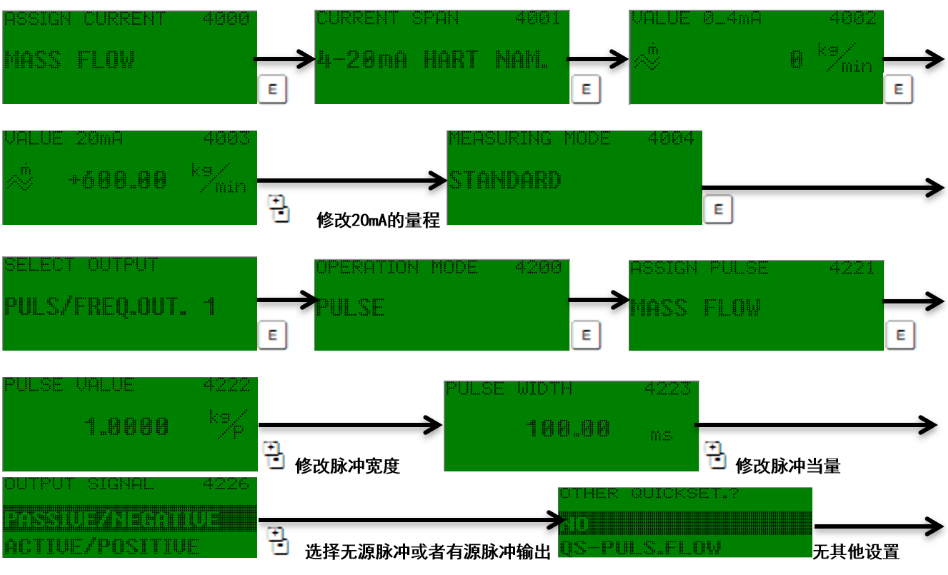
Key Parameters and Output Configuration
The core parameters involved in quick setup include language, units, current output, and pulse output. Correctly configuring these parameters ensures compatibility between the instrument and the control system.
| Parameter Category | Description | Typical Options |
|---|---|---|
| Language | Interface display language | Chinese, English, etc. |
| Units | Engineering units for flow, mass, etc. | kg/h, t/h, lb/min, etc. |
| Current Output | 4-20mA analog output range | Corresponding to flow range |
| Pulse Output | Pulse equivalent or frequency output | Pulses per unit |
Common Operating Precautions
- When modifying parameters, if you need to cancel the input, press "+" and "-" simultaneously.
- When exiting the menu, you can exit step by step or long-press the combination keys to return directly to the main display page.
- Password input supports "0083" or the abbreviated "83"; pay attention to the changes in the "*" symbols.
- When operating the optical touch keys, avoid direct strong light to ensure responsive sensitivity.
Summary
The quick setup of the Promass 83 Coriolis mass flowmeter relies on the correct use of optical touch keys and menu navigation. Through the QUICKSETUP menu, language, units, current output, and pulse output configurations can be efficiently completed. By following the steps in this article, engineering technicians and procurement personnel can quickly complete instrument commissioning and reduce on-site downtime.