
83 Series Mass Flow Meter Unit Modification and Quick Setup Overview
The 83 series mass flow meter supports quick setup of parameters such as language, units, current output, and pulse output through photosensitive touch keys. The operation interface is simple and suitable for on-site engineers to adjust quickly. Mastering key combinations and menu logic can significantly improve commissioning efficiency.
Photosensitive Touch Key Function Description
The front of the instrument is equipped with three photosensitive touch keys, namely the "+", "-", and "E" keys. The functions of each key are as follows:
- "+" key: Increase the value or switch options upward.
- "-" key: Decrease the value or switch options downward.
- "E" key: Enter the menu or confirm input.
Pressing the "+" and "-" keys simultaneously can execute exit or cancel operations. See below for specific combinations.
Quick Setup Menu Entry and Password Input
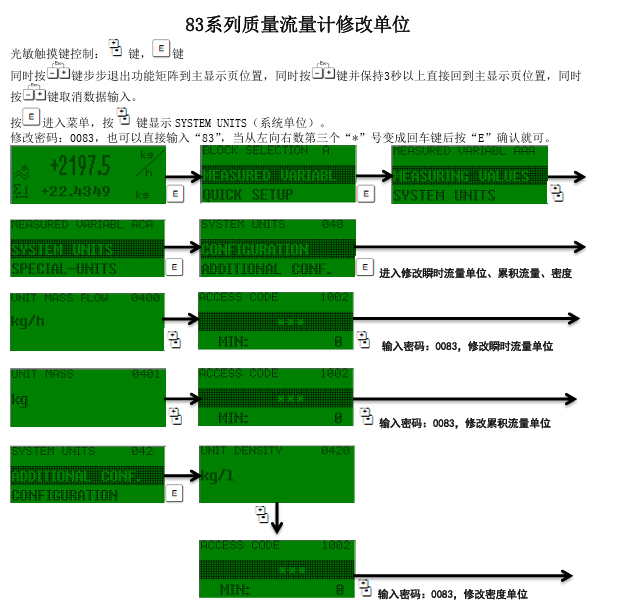
Entering the Quick Setup Menu
- Press the "E" key to enter the main menu.
- Use the "+" or "-" key to find the QUICKSETUP option.
- Press the "E" key to confirm entry.
Modifying the Password
The default password is 0083, or you can directly enter 83. When entering, after the third "*" from left to right changes to a carriage return symbol, press the "E" key to confirm.
Unit Modification Operation Steps
After entering the quick setup menu, you can modify units such as mass flow and volume flow. The specific steps are as follows:
- In the QUICKSETUP menu, use the "+" or "-" key to select the unit setting option.
- Press the "E" key to enter the unit selection interface.
- Use the "+" or "-" key to switch to the desired unit (such as kg/h, t/h, lb/min, etc.).
- Press the "E" key to confirm the modification.
Exit and Cancel Operations
During operation, you can exit or cancel input at any time:
- Step-by-step exit: Press the "+" and "-" keys simultaneously to step back through the function matrix to the main display page.
- Direct return to main display page: Press the "+" and "-" keys simultaneously and hold for more than 3 seconds.
- Cancel data input: Press the "+" and "-" keys simultaneously.
Common Units and Applicable Scenarios
| Unit Type | Common Units | Applicable Scenarios |
|---|---|---|
| Mass flow | kg/h, t/h, lb/min | Chemical, petroleum, pharmaceutical |
| Volume flow | L/min, m³/h, gal/min | Water treatment, gas metering |
| Density | kg/m³, g/cm³ | Concentration control, recipe management |
Operation Precautions
- Before operation, ensure the instrument is on the main display page to avoid entering other menus by mistake.
- After modifying units, check whether the current output and pulse output are updated synchronously.
- If you forget the password, try the default password 0083 or 83.
- The photosensitive touch keys require a light touch to avoid accidental operation caused by pressing hard.