
Prosonic 91 Cumulative Flow Reset to Zero Overview
The cumulative flow function of the Prosonic 91 flowmeter is used to record the total amount of fluid. When metering needs to be restarted or after maintenance, a reset to zero operation must be performed. Correct resetting to zero can avoid data confusion and ensure the accuracy of subsequent cumulative values. This article will guide you through the reset steps and explain the display rules for the cumulative flow value.
Composition of the Cumulative Flow Value and Overflow Value
The cumulative flow number consists of up to a 7-digit floating-point number. When the cumulative amount exceeds 9,999,999, the instrument extends the display range through the overflow value (OVERFLOW) function. The effective total cumulative amount is equal to the value of the OVERFLOW function plus the value of the SUM function.
Example of Reading the Overflow Value
Assume the OVERFLOW value is 2E7 dm³ (i.e., 20,000,000 dm³), and the value on the SUM function is 196,845 dm³. Then the effective total cumulative value is 20,196,845 dm³. The calculation method is as follows:
- OVERFLOW value: 2E7 dm³ = 20,000,000 dm³
- SUM function value: 196,845 dm³
- Effective total cumulative value: 20,000,000 + 196,845 = 20,196,845 dm³
Steps for Resetting Cumulative Flow to Zero
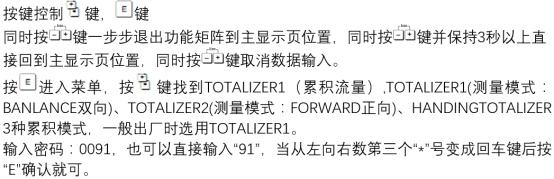
Before performing the reset to zero, please confirm that the current cumulative value has been recorded. The operation steps are as follows:
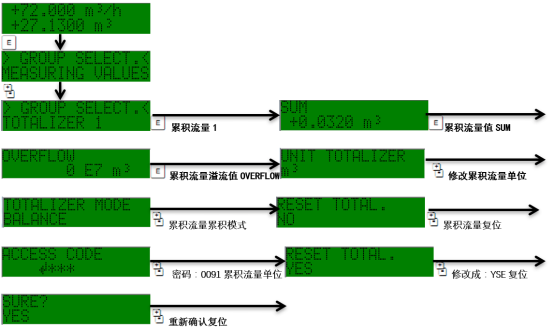
- Enter the instrument main menu and select the cumulative flow function group.
- Find the reset to zero option (usually labeled Reset or Clear).
- Confirm the reset operation, and the instrument will reset the cumulative flow value to zero.
- Check whether both the SUM and OVERFLOW values have been reset to 0.
Note: After resetting to zero, the overflow value OVERFLOW will also be reset simultaneously to ensure that subsequent metering starts from zero.
Common Problems and Precautions
During operation, you may encounter the following situations:
| Problem | Possible Cause | Solution |
|---|---|---|
| Unable to reset to zero | The instrument is in a locked state | Enter the correct password or contact the administrator to unlock |
| The value is not 0 after resetting | There is an overflow value that has not been reset | Check the OVERFLOW function and reset it manually |
| Abnormal cumulative value display | Power fluctuation or interference | Restart the instrument or check the wiring |
Regular resetting to zero helps with segmented metering and data analysis. If historical data needs to be retained, please record it before operating.