
Promag 10 5XBB Customer-Specific Password Setup Overview
Promag 10 5XBB is an electromagnetic flowmeter launched by Endress+Hauser, widely used in industrial process measurement. To prevent unauthorized parameter modification, the instrument supports setting a customer-specific password.
This article is intended for engineering and technical personnel and procurement staff, explaining the password setup process with illustrations to help you quickly complete instrument security configuration.
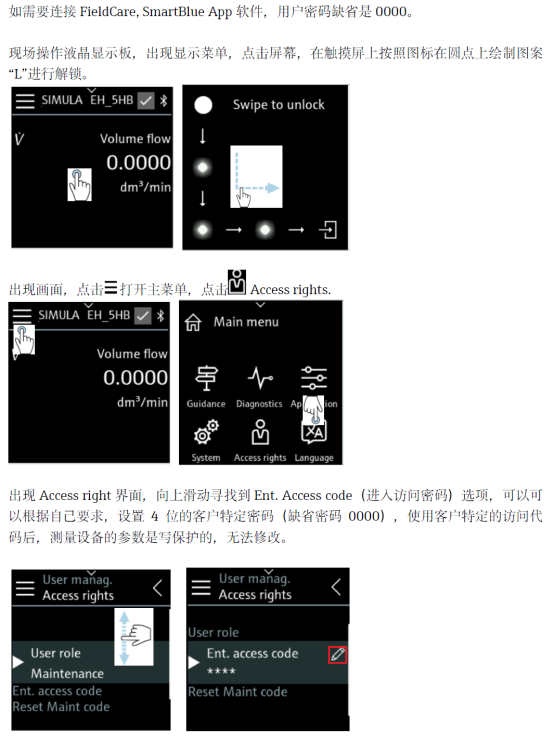
Steps to Set the Customer-Specific Password
Please follow the steps below to set the customer-specific password on the Promag 10 5XBB. Before operation, ensure the instrument is powered on and in measurement mode.
- Press the E key to enter the main menu.
- Use the + or - key to select the “Setup” menu, then press E to confirm.
- Select the “System” submenu, then press E to confirm.
- Select “Access code”, then press E to confirm.
- Enter your desired customer-specific password (up to 4 digits). Use the + or - key to change each digit, and press E to move to the next digit.
- After entering, press E to confirm. The screen displays “Save”; press E again to save the settings.
After successful setup, exit the menu, and the instrument will enable password protection. The password will be required the next time parameters are modified.
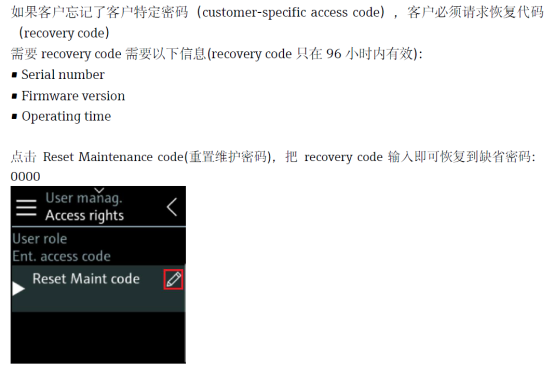
Precautions and FAQs
When setting the customer-specific password, please note the following points:
- Password range: 0000 to 9999; the factory default is usually 0 (no password).
- Lost password: If you forget the password, contact Endress+Hauser service personnel to unlock it using a dedicated tool.
- Permission management: It is recommended that a designated person keep the password to avoid accidental operation.
- Compatibility: These steps apply to the Promag 10 5XBB series; other models may differ slightly.
Parameter Comparison and Recommendations
The table below compares instrument behavior under different password setting states for your reference.
| Password Status | Access Permission | Applicable Scenario |
|---|---|---|
| No password (default) | Anyone can modify parameters | Commissioning phase or non-critical applications |
| Customer-specific password | Password required to modify parameters | Normal production, preventing accidental operation |
| Service password | Used by Endress+Hauser service personnel | Maintenance or advanced configuration |
It is recommended to set the customer-specific password immediately after instrument commissioning to ensure process safety.