
Promag 10 5XBB Customer-Specific Password Setting Overview
Promag 10 5XBB is an electromagnetic flowmeter under Endress+Hauser for industrial process measurement. To prevent unauthorized personnel from modifying instrument parameters, this series supports setting a customer-specific password to protect on-site operations with access permissions.
This article is intended for engineering technicians and procurement personnel, explaining the standard procedure and precautions for setting a customer-specific password on the Promag 10 5XBB.
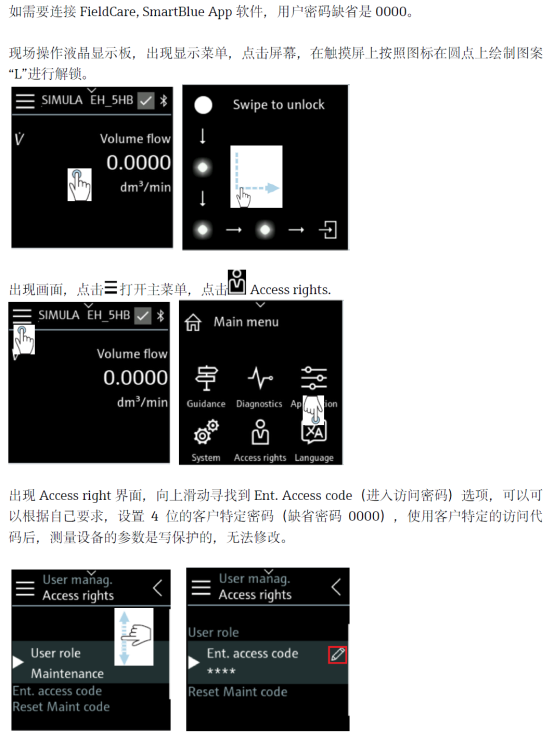
Preparation Before Setting
Prerequisites
- The instrument is powered on and in normal measurement or standby state
- The operator has access to the on-site display module
- It has been confirmed that no other restrictive password policy is currently enabled
Precautions
- Once the customer-specific password is set, it must be properly recorded; if lost, it is necessary to contact the manufacturer or restore it via a service code
- It is recommended to set it uniformly after commissioning is completed, to avoid frequent unlocking during commissioning
- Password setting does not affect measurement accuracy; it only restricts parameter modification permissions
Customer-Specific Password Setting Steps
Operating Procedure
- Enter the instrument main menu and select the Setup menu item.
- In the submenu, find options related to System or Access.
- Select the Customer-specific password function item.
- Enter the new password as prompted, usually a 4-digit numeric combination.
- Enter the password again for confirmation to ensure both entries match.
- Save the settings and exit the menu; the instrument automatically returns to the measurement interface.
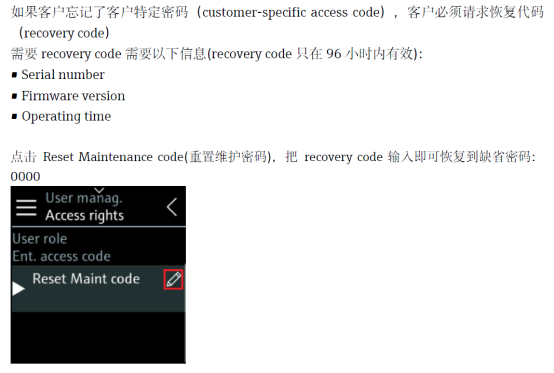
Key Parameters and Operating Points
Parameter Description
| Item | Description |
|---|---|
| Password type | Customer-specific |
| Password length | Usually 4 digits |
| Scope of effect | Restricts parameter modification and menu access |
| Recovery method | Service code or manufacturer support |
Operating Points
- When entering the password, pay attention to the key response of the display module to avoid accidental touches
- Before confirming the password, it can be recorded in the commissioning record table
- After setting is completed, it is recommended to test the unlock process once to confirm the password is valid
Common Issues and Recommendations
Common Issues
- Forgot password: It is necessary to use the manufacturer service code or return to the factory for processing; it cannot be reset by yourself
- Password not effective: Check whether it was saved successfully, or whether a higher-priority password exists
- Cannot enter menu: Confirm whether it is currently locked by another password
Engineering Recommendations
- Include the customer-specific password in the instrument commissioning handover documentation
- For multiple instruments, it is recommended to use a unified coding rule for easier management
- During procurement, confirm the password policy and recovery service terms with the supplier