
Promag 10 5XBB Display Mode Modification Overview
Promag 10 5XBB is an electromagnetic flowmeter launched by Endress+Hauser, supporting on-site display of multiple process variables. By modifying the display mode, users can view multivariable information such as flow rate and totalizer on the same screen.
This article is intended for engineering technicians and procurement personnel, introducing how to switch the display mode of the Promag 10 5XBB to multivariable display, and providing key operating points and precautions.
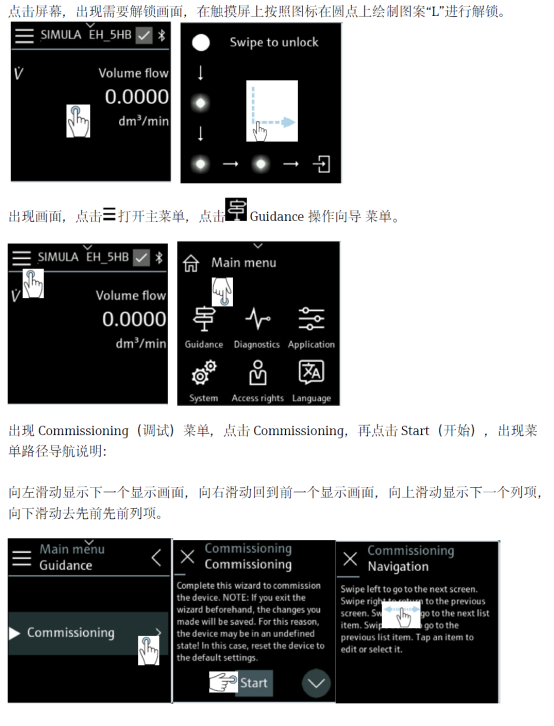
Preparation Before Modifying the Display Mode
Confirm Device Status
- Confirm that the Promag 10 5XBB is properly powered on and the display screen can light up normally.
- Confirm that on-site operating permission has been obtained to avoid accidentally changing other parameters.
- It is recommended to record the current display configuration for easy recovery in case of abnormalities.
Understand Display Variable Types
- Instantaneous flow rate: the current flow rate value of the medium in the pipeline.
- Accumulated total: forward, reverse, or net accumulated flow.
- Multivariable display: display multiple variables on the same screen in turn or side by side.
Operating Steps to Modify the Display Mode of Promag 10 5XBB
- Enter the on-site display menu and find Display Settings or Display-related options.
- Select the Display Mode parameter and enter the display mode selection interface.
- Switch the display mode from single-variable to multivariable display.
- Check the variables to be displayed as needed, such as instantaneous flow rate and accumulated total.
- Save the settings and return to the main interface to confirm that the multivariable display takes effect.
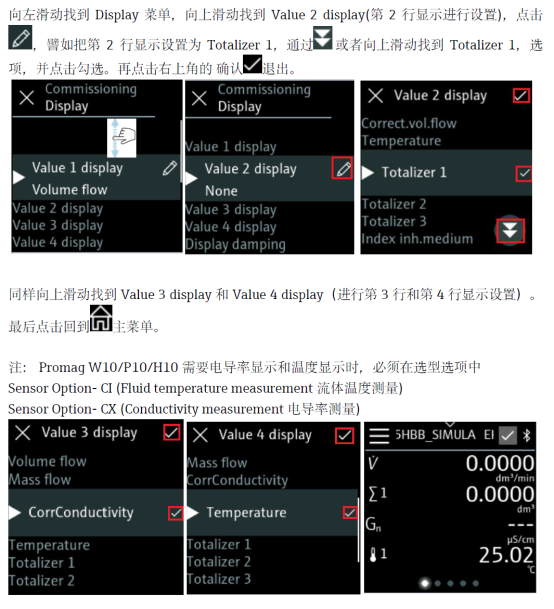
Display Mode Comparison and Parameter Description
| Display Mode | Display Content | Applicable Scenario |
|---|---|---|
| Single-variable display | Displays only one main variable | Simple metering, quick on-site reading |
| Multivariable display | Displays multiple variables on the same screen | When flow rate and total need to be monitored simultaneously |
Precautions for Modifying the Display Mode
- Modifying the display mode does not affect measurement accuracy; it only changes the human-machine interface presentation.
- Menu names may vary slightly among different firmware versions; please refer to the actual display.
- If the display is abnormal, you can restore the factory display settings and reconfigure.
- For trade settlement scenarios, it is recommended to record and lock the accumulated total parameters.
Summary
Through the above steps, you can quickly complete Promag 10 5XBB display mode modification and achieve multivariable display on the same screen. Properly configuring the display mode helps improve on-site inspection efficiency and data readability.