
Promag 10 Pulse Output Setup Overview
Promag 10 is an electromagnetic flowmeter launched by Endress+Hauser and is widely used in industrial flow measurement. Its pulse output function can convert flow signals into frequency signals for acquisition by PLCs, counters, and other devices. Correctly setting the pulse output is crucial to system measurement accuracy.
This article introduces the hardware wiring and software parameter configuration of the Promag 10 pulse output step by step, and provides troubleshooting methods for common problems.
Hardware Wiring and Output Types
Pulse Output Terminal Definition
The Promag 10 usually provides active or passive pulse output, depending on the model. Before wiring, confirm the transmitter terminal markings. Common terminals are 24/25 (pulse/frequency output).
- Active pulse output: directly outputs a level signal and requires no external power supply.
- Passive pulse output: requires an external power supply (usually 24V DC) and is suitable for long-distance transmission.
Please refer to the figure below to confirm the wiring method:
Parameter Setup Steps
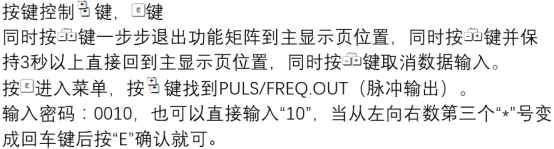
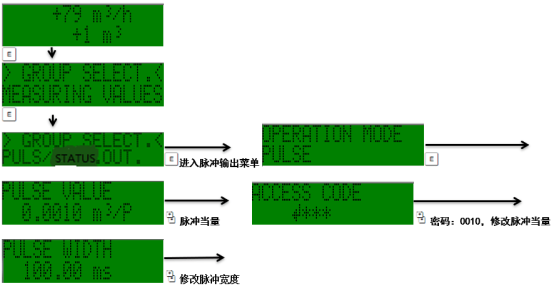
Entering the Menu and Selecting the Output Type
Use the local display or commissioning software to enter Main Menu → Setup → Output. Select Pulse Output as the output type and specify the corresponding terminal.
Configuring the Pulse Equivalent
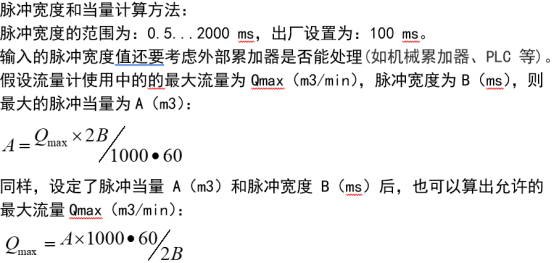
The pulse equivalent determines the flow volume represented by each pulse (for example, 1 pulse = 0.1 L). It must be set according to the requirements of the downstream device to ensure that the frequency does not exceed the output upper limit (usually ≤10 kHz).
| Parameter | Description | Typical Value |
|---|---|---|
| Pulse equivalent | Volume corresponding to each pulse | 0.1 L/P |
| Pulse width | Duration of the pulse high level | 0.1 ms |
| Output direction | Forward/Reverse/Bidirectional | Forward |
After setting is complete, save and exit. The figure below shows the pulse equivalent setup interface:
Common Problems and Troubleshooting
- No pulse output: Check whether the wiring is correct, whether the power supply is connected, and whether the output is enabled.
- Abnormal pulse frequency: Confirm that the pulse equivalent setting matches the flow range and avoid exceeding the limit.
- Large counting error: Check whether the pulse width meets the requirements of the acquisition device, or switch to frequency output.
If the problem persists, it is recommended to use an oscilloscope to measure the output waveform or contact the manufacturer's technical support.