
Promag 50 Cumulative Flow Reset to Zero Overview
Promag 50 is a commonly used electromagnetic flowmeter in industrial sites, and its cumulative flow function is used to count the total flow of fluid in the pipeline. During equipment maintenance, batch switching, or calibration, it is often necessary to perform a reset to zero operation on the cumulative flow. The correct zeroing process can avoid data confusion and ensure measurement accuracy.
Preparation Before Zeroing
Safety and Permission Confirmation
- Ensure the process pipeline is in a safe state, or operation permission has been obtained.
- Confirm that the current user has parameter modification permission for the instrument (usually requires a professional password).
- Record the cumulative flow value before zeroing for subsequent comparison or auditing.
Tools and Materials
- Promag 50 operation manual or quick guide.
- If remote operation is required, prepare a HART communicator or debugging software.
Cumulative Flow Reset to Zero Operation Steps
Operation via Local Display Interface
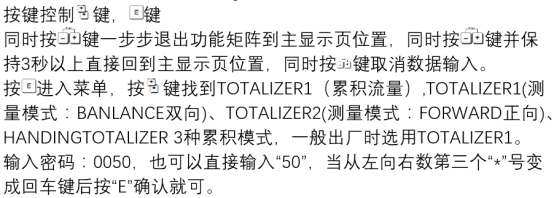
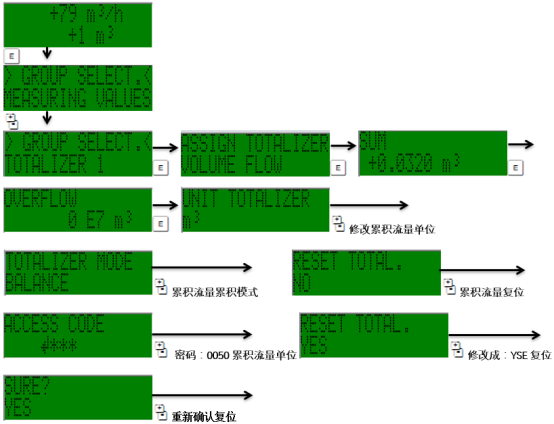
- Press the E key to enter the main menu, and use the +/- keys to select the "Operation" or "Totalizer" menu.
- Find the "Cumulative Flow Reset" option and press the E key to confirm.
- The screen prompts to confirm the reset; select "Yes" and press the E key again to execute.
- After a successful reset, the cumulative flow display value returns to zero.
Operation via HART Communicator
- Connect the HART communicator to the instrument communication terminals.
- Enter the "Diagnostics/Service" menu and select "Totalizer Reset".
- Execute the reset command and confirm the operation.
Operation via Debugging Software
- Use Endress+Hauser's FieldCare or DeviceCare software to connect to the instrument.
- Find the "Cumulative Flow" node in the device function tree and click the "Reset" button.
- After confirmation, zeroing is completed.
Precautions for Zeroing Operation
- Permission Management: Some models require a password to reset to prevent misoperation.
- Data Backup: It is recommended to record the original cumulative value before zeroing for traceability.
- Process Impact: Zeroing does not affect instantaneous flow measurement but resets the total statistics.
- Multiple Totalizers: If the instrument supports multiple totalizers (e.g., forward, reverse), they need to be reset separately.
Common Problems and Solutions
| Problem | Possible Cause | Solution |
|---|---|---|
| Cannot enter reset menu | Insufficient permission or incorrect password | Enter the correct professional password or contact the administrator |
| Value does not return to zero after reset | Operation not confirmed or communication interrupted | Re-execute reset and confirm |
| HART communication failure | Incorrect wiring or address conflict | Check loop resistance and address settings |
Summary
Promag 50 cumulative flow reset to zero is a routine maintenance operation that can be completed through the local interface, HART communicator, or debugging software. During operation, attention must be paid to permissions, backup, and confirmation steps to ensure accurate zeroing. Regular maintenance can extend the instrument's service life and ensure the reliability of flow measurement.