
Promag 50 Electromagnetic Flowmeter Quick Setup Guide
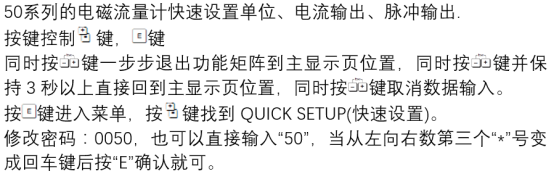
Promag 50 is an electromagnetic flowmeter widely used in industrial fields, and its quick setup function can significantly improve commissioning efficiency. This guide is intended for engineering technicians and procurement personnel, providing clear setup steps and key points.
1. Preparation Before Setup
Before starting quick setup, please ensure the following preparation work is completed to avoid operation interruption or equipment damage.
- Check power supply and wiring: Confirm that the supply voltage matches the nameplate and that the signal cables are connected correctly.
- Confirm pipeline status: The pipe should be full, and the flow direction should match the sensor arrow.
- Prepare a parameter list: Including key parameters such as pipe diameter, measuring range, and medium conductivity.
2. Quick Setup Steps
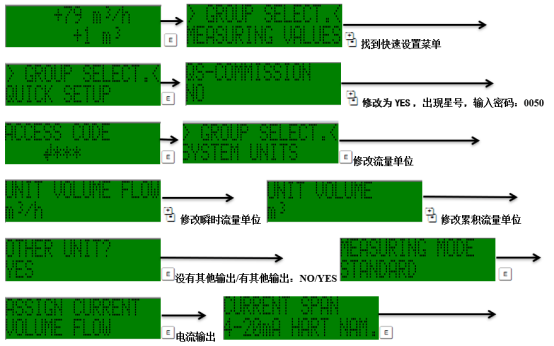
Promag 50 supports quick setup through the local display or commissioning software. The general steps are as follows.
2.1 Enter the Quick Setup Menu
- After power-on, wait for the device self-test to complete.
- Press the "E" key to enter the main menu and select "Quick Setup".
- Enter the password (the default factory password is "50").
2.2 Configure Key Parameters
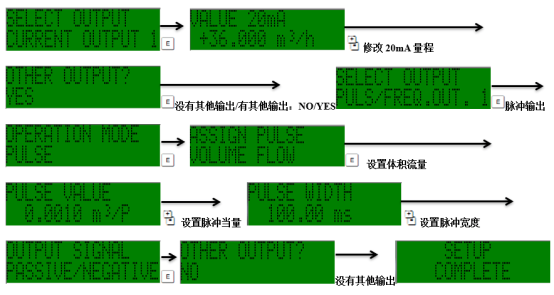
According to the actual application, set the following parameters in sequence:
- Pipe diameter: Must match the sensor nameplate.
- Measuring range: It is recommended to set it to 1.2~1.5 times the normal flow rate.
- Medium conductivity: Ensure it is above the minimum requirement (usually ≥5 µS/cm).
- Output signal: Select 4-20 mA, pulse, or frequency output.
2.3 Save and Verify
- After completing the setup, select "Save" to save the parameters.
- Return to the main interface and check whether the measured value is stable.
- Perform zero calibration if necessary.
3. Parameter Reference and Comparison
The table below lists the recommended values for common Promag 50 parameters for reference during quick setup.
| Parameter | Recommended Value | Description |
|---|---|---|
| Pipe diameter | Same as sensor | Must match, otherwise accuracy will be affected |
| Measuring range | 1.2~1.5 times the normal flow rate | Avoid over-range or low-flow errors |
| Conductivity | ≥5 µS/cm | Special handling is required below this value |
| Output signal | 4-20 mA | Select according to the control system |
4. Common Issues and Precautions
The following problems may be encountered during quick setup. Please refer to the handling suggestions.
- Fluctuating measured value: Check whether the pipe is full and remove air bubbles.
- No output signal: Confirm that the wiring is correct and the output parameters are enabled.
- Wrong password: Try the default password "50", or contact the manufacturer.
Note: After modifying parameters, be sure to save them and record the set values for future maintenance.
5. Summary
The quick setup function of Promag 50 can help users complete commissioning quickly, but accurate parameters must be ensured. Following this guide can improve setup efficiency and ensure measurement reliability.