
Promag 50 Startup Display and Key Operation Overview
After the Promag 50 electromagnetic flowmeter is powered on, it sequentially completes three stages: startup information display, software information verification, and measured value display. The entire process requires no manual intervention; operators only need to confirm whether the displayed content is normal. The following sections explain the startup sequence and key functions separately.
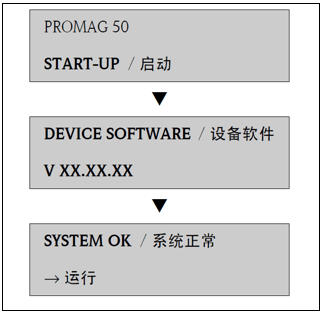
Startup Process and Display Information
Startup Information and Software Information
After the device is powered on, the startup information is displayed first, followed by the current software information on the screen, allowing on-site personnel to verify the instrument version. This information typically lasts for a few seconds and is part of the normal self-check process.
Entering Operating Status
After the startup process is complete, the measuring device begins operation, and various measured variables and/or status variables appear on the display. At this point, the instrument enters normal measurement mode, and key data such as instantaneous flow rate and totalizer values can be read.
Operating Key Function Description
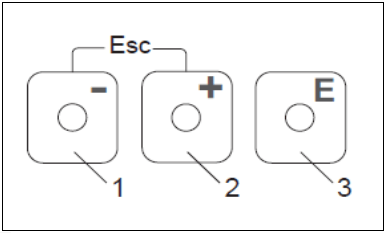
On-site operation of the Promag 50 is mainly accomplished using three keys: the minus key (-), the plus key (+), and the enter key. The specific functions of each key are shown in the table below.
| Key | Symbol | Main Function |
|---|---|---|
| Minus key | - | Used to enter or select negative values or options |
| Plus key | + | Used to enter or select positive values or options |
| Enter key | Enter | Used to call up function menus and save settings |
| Combination key | +/- pressed simultaneously | Triggers the Esc function, used to exit or cancel |
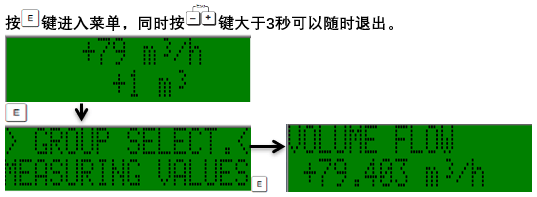
Esc Combination Key Operation
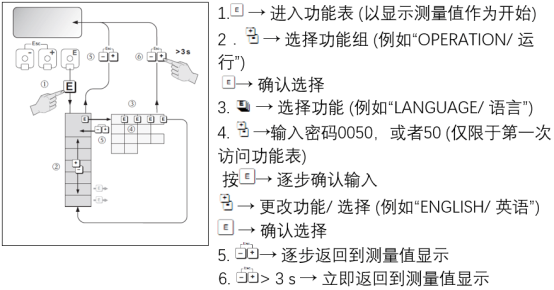
When the +/- keys are pressed simultaneously, the Esc function is triggered, enabling the following two operations:
- Step-by-step exit from the function menu: Each press returns to the previous menu level.
- Long press for more than 3 seconds: Cancels the current data input and returns directly to the measured value display interface.
Common Operating Recommendations
- After power-on, first confirm that the software information matches the device nameplate version.
- When entering the function menu to modify parameters, use the +/- keys to adjust values and press the enter key to save.
- If you accidentally enter a menu or make an input error, long-press the +/- combination keys for more than 3 seconds to quickly return to the measurement interface.
- For routine inspections, simply observe whether the measured value display is stable; frequent key operations are not required.
Summary
The startup display and key logic of the Promag 50 are clear: after power-on self-check, it enters the measured value interface, and all on-site operations can be completed using the three keys in combination with the Esc combination key. Mastering the above process can effectively improve commissioning efficiency and reduce operational errors.