
Promag 50 Current Output Range Setting Overview
Promag 50 electromagnetic flowmeter current output range setting is a key part of on-site commissioning and directly affects the accuracy of signal transmission. Correct range configuration ensures that the 4-20mA signal received by the PLC or DCS system corresponds linearly to the actual flow. Based on the actual operation interface, this article introduces the setting method step by step.
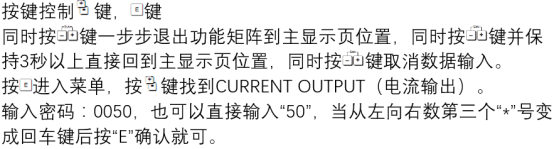
Preparation Before Setting
Before starting the setting, please confirm that the following conditions are met to avoid operation interruption or parameter errors.
- The instrument is powered on and in measurement mode.
- The current pipeline's maximum flow value has been obtained (e.g., 100 m³/h).
- The output signal type is known: 4-20mA (default) or user-defined.
- Prepare the operation manual or a notebook to record the original parameters.
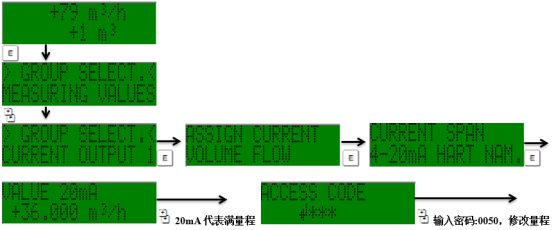
Current Output Range Setting Steps
The following steps are based on operation via the Promag 50 local display interface, using the E, +, and - keys to complete navigation and value modification.
- Press the E key to enter the main menu, and use the + or - key to select the "Setup" menu.
- Press the E key to confirm, then select "Current Output" in the submenu.
- Press the E key again and find the "Range" option.
- Enter the flow value corresponding to 4mA (usually 0), and press the E key to save.
- Enter the flow value corresponding to 20mA (i.e., the full-scale value), and press the E key to save.
- Check whether the display is normal, then exit the menu and return to measurement mode.
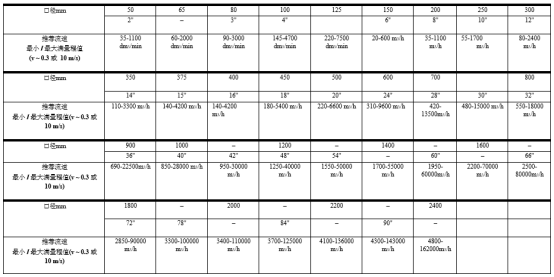
Key Parameters and Precautions
During the setting process, pay attention to the following parameters to ensure the output signal matches the system.
| Parameter | Description | Typical Value |
|---|---|---|
| Flow corresponding to 4mA | Flow value corresponding to the lower output current limit | 0 m³/h |
| Flow corresponding to 20mA | Flow value corresponding to the upper output current limit | 100 m³/h |
| Output Type | Current output mode | 4-20mA |
| Alarm Response | Output current during fault | 22mA or 3.6mA |
Note: The range setting must match the actual pipeline maximum flow, otherwise it will cause signal saturation or reduced resolution. It is recommended to use a multimeter to measure the output current after setting to verify linearity.
Common Problems and Troubleshooting
If the output is abnormal after setting, refer to the following troubleshooting directions.
- Output is always 4mA: Check whether the range is set too small, or whether there is no flow in the pipeline.
- Output is always 20mA: Check whether the range is set too large, or whether the flow exceeds full scale.
- Output fluctuates greatly: Confirm that grounding is good and eliminate electromagnetic interference.
- Cannot enter the menu: Check whether it is in locked mode and enter the password to unlock.