
The Role and Setting Method of Promag 50 Display Damping Time
Promag 50 is an electromagnetic flowmeter commonly used in industrial sites, and its display damping time is used to smooth fluctuations in flow readings. Reasonably increasing the damping time can effectively suppress display jitter caused by fluid pulsation or bubble interference and improve reading stability. This article is intended for engineering technicians and procurement personnel and explains how to increase the display damping time for the Promag 50.
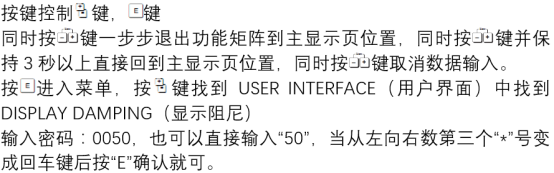
Basic Concept of Display Damping Time
What Is Display Damping Time
Display damping time refers to the length of the period over which the flowmeter averages the measured value. The longer the damping time, the smoother the change in the displayed value, but the response speed will slow down accordingly. This parameter is usually expressed in seconds and can be adjusted in the transmitter menu.
Applicable Scenarios for Increasing Damping Time
- The fluid has pulsation or bubbles, causing frequent jitter in the flow display;
- The process requires stable readings and allows sacrificing some dynamic response;
- The downstream control system is sensitive to instantaneous fluctuations and requires filtering.
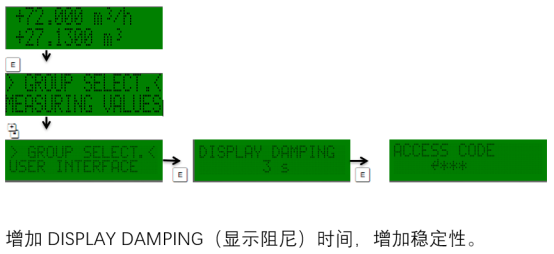
Operating Steps to Increase Display Damping Time
The following steps apply to the Promag 50 transmitter. The specific menu path may vary slightly depending on the firmware version; please refer to the on-site device.
- Enter the transmitter main menu and select the "Setup" or "Parameter" option.
- Find the "Display" or "Damping" submenu and locate the "Display Damping Time" parameter.
- Increase the value as needed, for example, from the default 1 second to 3 seconds or 5 seconds.
- Confirm and save, then return to the measurement interface to observe display stability.
Parameter Adjustment Reference
| Damping Time (seconds) | Display Stability | Response Speed | Applicable Scenario |
|---|---|---|---|
| 0~1 | Low | Fast | Fast process control |
| 2~5 | Medium | Medium | General industrial measurement |
| 6~10 | High | Slow | Pulsating flow or high-precision metering |
Precautions
- Increasing the damping time will reduce the response speed to sudden flow changes, so a trade-off must be made according to process requirements.
- If the display is still unstable, troubleshoot root causes such as grounding, bubbles, or electrode contamination.
- After modifying parameters, it is recommended to record the original values for restoration or comparison.
Summary
Increasing the display damping time for the Promag 50 is an effective means of improving flow display stability. By adjusting the damping time parameter through the menu and selecting an appropriate value based on actual working conditions, a balance can be achieved between stability and response speed. After correct setting, the flowmeter can better serve industrial process measurement.