
Promag 53 Parameter Modification and Storage Overview
Promag 53 is a high-performance electromagnetic flowmeter launched by Endress+Hauser, widely used in industrial process measurement. During on-site commissioning or maintenance, parameters often need to be modified and saved. This article uses a combination of text and images to explain its operation process and key points.
Preparation and Safety Precautions Before Operation
Before modifying parameters, please confirm that the instrument is in a safe environment and ensure that authorization has been obtained. It is recommended to record the original parameters for restoration. At the same time, prepare the operation manual or parameter list to avoid misoperation.
- Ensure that the instrument power supply is normal and there are no alarms on the display.
- Confirm the current measurement status and switch to programming mode if necessary.
- Prepare a small screwdriver or special tool for opening the housing (if needed).
Detailed Steps for Parameter Modification
Promag 53 parameters are modified through the on-site display unit or commissioning tool. The following uses the on-site display unit as an example to explain the general process.
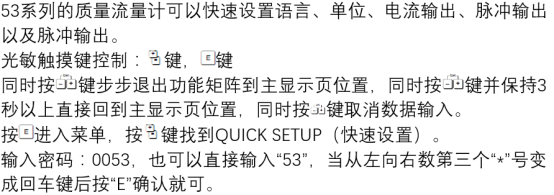
- Press the E key to enter the main menu, and use the + or - key to select "Setup".
- Press the E key to confirm, enter the submenu, and select the parameter group to be modified, such as "Process Parameter".
- Find the target parameter, press the E key to enter editing status, and the value or option will flash.
- Use the + or - key to adjust the value or switch options.
- Press the E key to confirm the modification. When the value stops flashing, it indicates that it has been temporarily accepted.
- Repeat the above steps to complete all parameters that need to be modified.
Parameter Storage and Activation
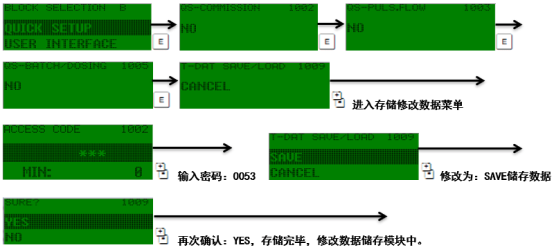
After modification is completed, the storage operation must be performed; otherwise, parameters may be lost after power failure. Promag 53 usually provides automatic or manual storage options.
- Automatic storage: Some versions automatically save when exiting the menu, but manual confirmation is recommended.
- Manual storage: In the "Setup" menu, select "Store Settings" and press the E key to execute.
- After successful storage, the display will return to the measurement interface or prompt "Store Completed".
If factory settings need to be restored, select "Restore Factory Settings" in the same menu, but this will overwrite the current parameters, so operate with caution.
Common Problems and Precautions
During operation, situations such as parameters cannot be modified or storage fails may be encountered. The common causes and handling suggestions are listed below.
| Problem Symptom | Possible Cause | Handling Suggestion |
|---|---|---|
| Parameters cannot be edited | The instrument is locked or write-protected | Enter the password or contact the administrator to unlock |
| Parameters are lost after storage | Storage was not performed correctly, or power was interrupted | Store again and ensure stable power supply |
| Display garbled characters or crashes | Electromagnetic interference or firmware failure | Restart the instrument and check grounding and shielding |
It is recommended to record parameter changes after each modification and back up regularly. For critical applications, software such as FieldCare can be used for parameter management.
Summary
Parameter modification and storage of Promag 53 are basic operations for commissioning and maintenance. Following the process of entering the menu → editing → confirming → storing, and paying attention to safety and backup, can effectively improve work efficiency. If complex problems are encountered, please refer to the official manual or contact technical support.