
Promag 53 Flowmeter Unit Modification Overview
Promag 53 is an electromagnetic flowmeter introduced by Endress+Hauser, widely used in industrial flow measurement. In practical applications, it is often necessary to modify the system units of instantaneous flow and cumulative flow according to process requirements. This article provides detailed operating instructions to help engineering technicians and procurement personnel quickly complete the setup.
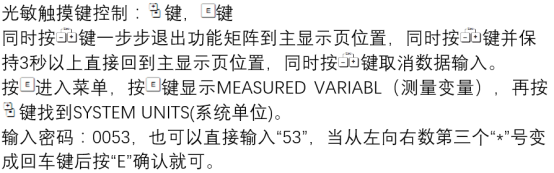
Steps to Modify Instantaneous Flow Unit
The instantaneous flow unit determines the display format of the real-time flow value. The modification method is as follows:
- Enter the main menu and select "Setup" → "Units".
- Select "Instantaneous Flow Unit" and press E to confirm.
- Use the + or - keys to browse available units (e.g., m³/h, L/min, kg/h, etc.).
- Press E to save the selection and return to the previous menu.
Note: Some units must be pre-enabled in the "Engineering Units" submenu.
Steps to Modify Cumulative Flow Unit
The cumulative flow unit affects the display of the total flow accumulation value. The operation is similar to that for instantaneous flow:
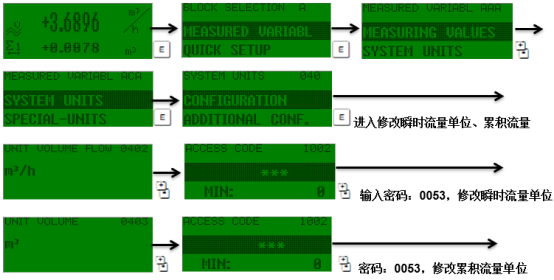
- Enter "Setup" → "Units".
- Select "Cumulative Flow Unit" and press E to enter.
- Select the target unit from the list (e.g., m³, L, kg, etc.).
- Press E to confirm; the system automatically converts the cumulative value.
Common Unit Reference and Precautions
The following table lists common units and their applicable scenarios for selection reference:
| Unit Type | Common Units | Applicable Scenarios |
|---|---|---|
| Instantaneous Flow | m³/h, L/min, kg/h | Process monitoring, control loops |
| Cumulative Flow | m³, L, kg | Trade settlement, batch metering |
Key Tips: After modifying units, check whether the span factor and pulse equivalent match to avoid abnormal output signals. It is recommended to operate under empty pipe or zero flow conditions.
Common Problems and Troubleshooting
- Unit cannot be selected: Check whether the corresponding engineering unit group has been enabled.
- Cumulative value not updated: Confirm whether the "Save" operation was performed after modification.
- Abnormal display: Restore factory settings and reconfigure the units.
By following the above steps, you can efficiently complete the unit modification of the Promag 53 flowmeter and ensure that the measurement data meets system requirements.