
Promag 400 Write Protection Function Overview
The Promag 400 electromagnetic flowmeter provides multiple write protection methods to prevent the configuration parameters of the measuring device from being accidentally changed. After setting a user-defined access password via the local display or web browser, the configuration parameters of the measuring device are write-protected and parameter values cannot be changed. When accessed via web browser, the device configuration parameters are also write-protected. A lock icon is displayed in front of write-protected parameters.
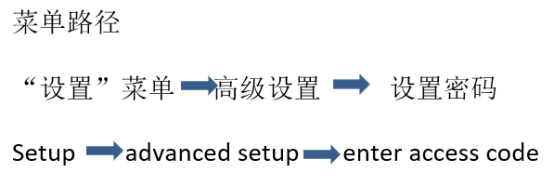
Setting Password Write Protection via Local Display
Setting an access password via the local display effectively protects parameters from being modified. The specific steps are as follows:
- Go to the Set password parameter.
- Set the password, up to four digits.
- Enter the password again and confirm.
After the setup is complete, a lock icon is displayed in front of write-protected parameters. In the menu and editing views, the device automatically locks write-protected parameters when no key is pressed for 10 minutes. The device automatically locks write-protected parameters 60 seconds after the user returns from the menu and editing views to the measured value display mode.
Setting Password Write Protection via Web Browser
When accessing the device via web browser, an access password can also be set to achieve write protection. The steps are as follows:
- Go to the Set password parameter.
- Set the access password, up to four digits.
- Enter the access password again and confirm.
After the setup is complete, the web browser switches to the login screen. Thereafter, accessing the device configuration parameters requires entering the password; otherwise, the parameters are write-protected and cannot be changed.
Setting Write Protection via Write Protection Switch
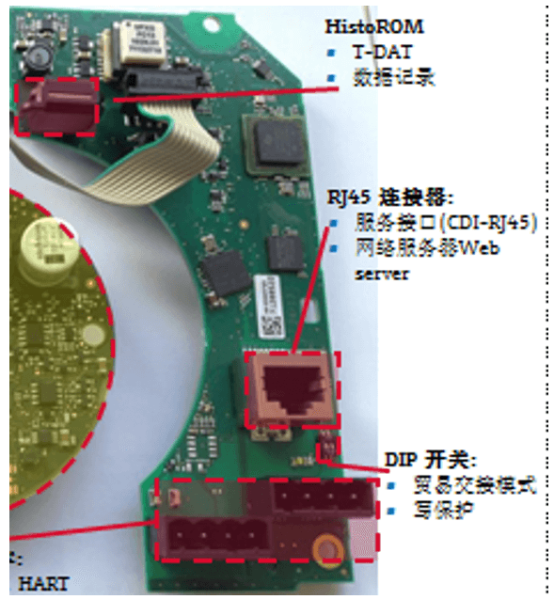
Unlike user-defined password write protection, using the locking switch can lock the entire operating menu, except for the display contrast parameter. In this case, parameters are read-only and cannot be modified (except for the display contrast parameter). This function can be activated in the following ways:
- Via local display
- Via service interface (CDI-RJ45)
Hardware write protection is active when the write protection switch on the main electronics module is in the ON position; hardware write protection is inactive when the switch is in the OFF position (factory default). If hardware write protection is activated, the Locking status parameter displays the hardware option.
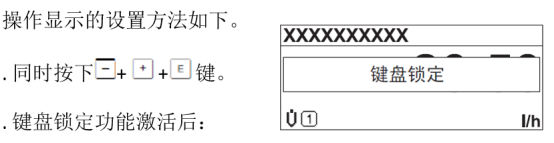
Setting Write Protection via Keypad Lock
After the keypad lock function is activated, the entire operating menu cannot be accessed via local operation. That is, it is no longer possible to browse the operating menu or modify individual parameters. The user can only read the measured values on the operational display. The method for enabling and disabling the keypad lock function is the same.
Comparison of Write Protection Methods
| Write Protection Method | Protection Scope | Setup Location | Features |
|---|---|---|---|
| User-defined password | Device configuration parameters | Local display or web browser | Up to four digits, automatic locking |
| Hardware write protection switch | Entire operating menu (except display contrast) | Main electronics module | Hardware switch, high priority |
| Keypad lock | Local operating menu | Local display | Only measured values can be read |
Selecting the appropriate write protection method according to actual requirements can effectively prevent parameters from being misoperated and ensure stable operation of the measuring system.