
Promag 400 Web Browser Commissioning Overview
The Promag 400 electromagnetic flowmeter supports commissioning via a web browser, allowing access to device parameters without dedicated software. This method is particularly suitable for on-site quick configuration and troubleshooting. The following sections describe the connection and setup process step by step.
Default Ethernet Settings
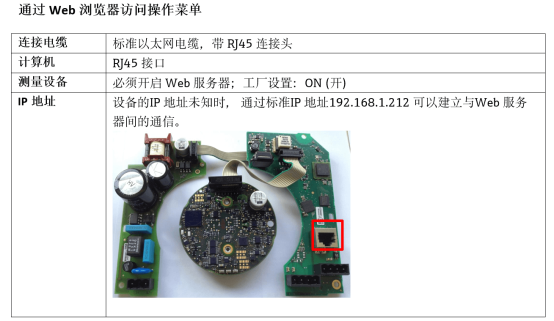
The device comes with preset Ethernet parameters to ensure quick communication when directly connected to a computer. The key default information is as follows:
- Device IP address: 192.168.1.212 (factory setting)
- Subnet mask: 255.255.255.0
- Default gateway: 192.168.1.1
If modification is needed, please refer to the device manual or adjust via the web interface.
Connecting the Computer and Setting Up the Network
Hardware Connection Steps
- Turn on the power to the Promag 400 measuring device.
- Connect the device to the computer using a standard Ethernet cable.
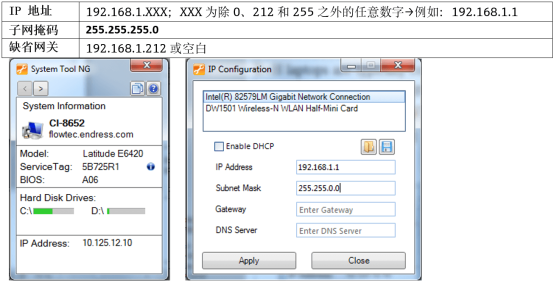
Computer Network Configuration
To ensure proper communication, please follow these steps:
- Close all unrelated applications on the computer, including E-mail, SAP, internet browsers, etc., to avoid network conflicts.
- In the computer's TCP/IP properties, set an IP address in the same subnet as the device, for example 192.168.1.100, with subnet mask 255.255.255.0.
- Confirm the settings, save, and exit.
Accessing the Web Server
Known Device IP Address
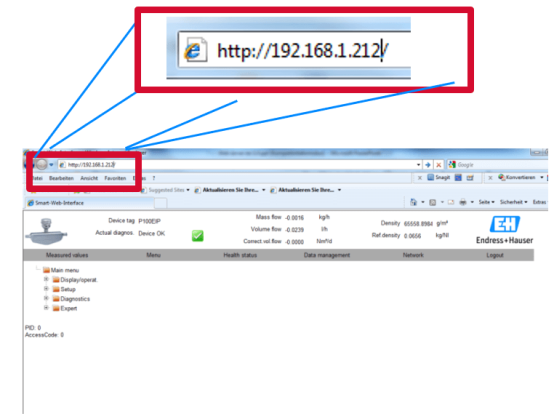
- Open a web browser (e.g., Chrome, Edge).
- Enter the device IP address in the address bar: 192.168.1.212, and press Enter.
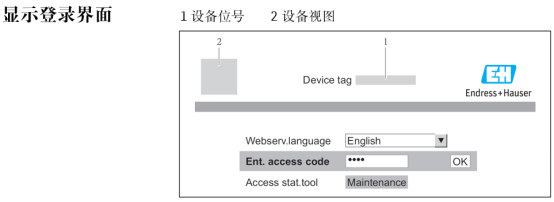
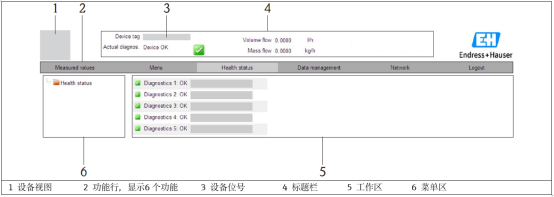
- The browser will display the Promag 400 web commissioning interface, where parameters can be viewed and modified.
Unknown Device IP Address
- Set DIP switch 10 on the device to the ON position.
- Restart the device; it will restore the factory default IP address 192.168.1.212.
- Access the web interface as described above, and after commissioning is complete, set DIP switch 10 back to OFF.
Common Issues and Precautions
- Ensure that the computer's firewall is not blocking browser access.
- If unable to connect, check whether the network cable and IP settings are in the same subnet as the device.
- After commissioning is complete, it is recommended to restore the computer's IP to automatic acquisition to avoid affecting other network usage.
By following the above steps, you can efficiently complete the web browser commissioning of the Promag 400.