
Promag 400 Web Browser Commissioning Overview
Promag 400 electromagnetic flowmeter supports commissioning and parameter setting via a web browser. Simply connect the device to a computer with a network cable and correctly configure the network parameters to access the device's built-in web server in a browser. This article is intended for engineering technicians and procurement personnel, outlining the complete process from connection and IP settings to device access.
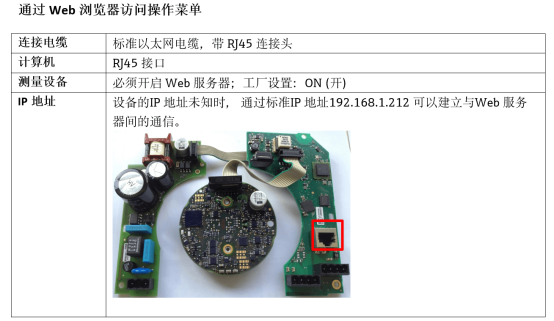
Establishing a Network Connection Between Computer and Device
Device Ethernet Default Settings
The Promag 400 has preset Ethernet parameters at the factory for quick direct commissioning. The following are the device's default network information:
| Parameter | Default Value |
|---|---|
| Device IP address | 192.168.1.212 (factory setting) |
| Subnet mask | 255.255.255.0 |
| Default gateway | 192.168.1.1 |
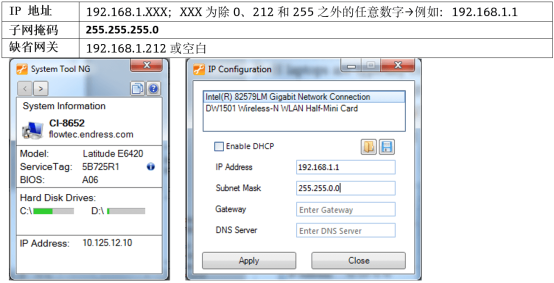
Connection and Configuration Steps
- Turn on the measuring device and connect the Promag 400 to the computer using a network cable.
- If the computer is not using a second network adapter, close all network-related applications, such as E-mail, SAP applications, Internet browsers, or Windows Explorer, to avoid network conflicts.
- Set the computer's Internet Protocol (TCP/IP) properties according to the table above to ensure the computer and device are on the same subnet.
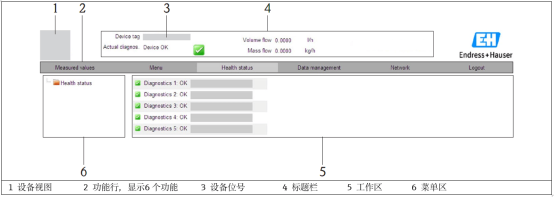
Opening a Web Browser to Access the Device
Access Method When the IP Address Is Known
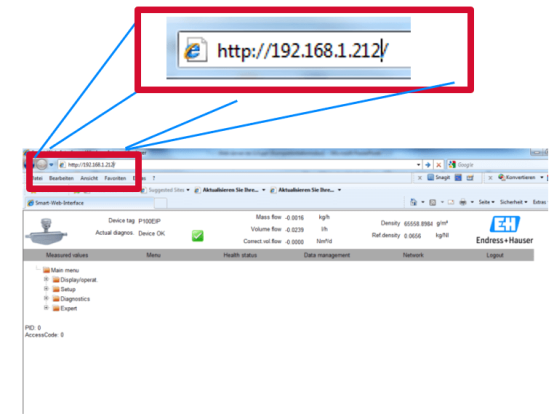
- Open a web browser and enter the web server IP address in the address bar: 192.168.1.212.
- If the measuring device's IP address is known, simply enter that specific address to access it.
Recovery Method When the IP Address Is Unknown
When the device IP address cannot be confirmed, restore the factory default IP via the DIP switch:
- Set DIP switch 10 to the ON position.
- Restart the device, and the device will output the standard IP address: 192.168.1.212.
- Enter this address in the browser's address bar to access the web server again.
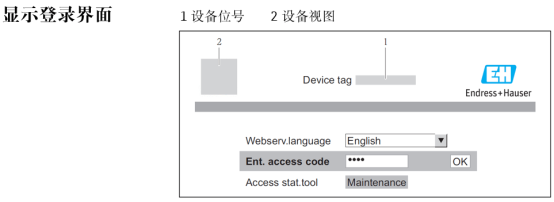
Commissioning Precautions
- Ensure that the IP addresses of the computer and the Promag 400 are on the same subnet, otherwise communication will fail.
- After commissioning, it is recommended to set DIP switch 10 back to OFF and record the actual IP address used.
- If using a corporate network, avoid IP address conflicts; modify the device IP or use a dedicated network adapter if necessary.